Separate no video, offline status, recording gaps and remote-viewing faults into testable causes. HJ checks a known local viewing path first, then power, connections, addressing, storage and account permissions, recording what was verified and what remains unresolved.
Installed system + service modeCCTV Troubleshooting in Kuching
01CCTV Troubleshooting in Kuching
02Troubleshooting
03Site fit, interfaces and verification
04day and night live image
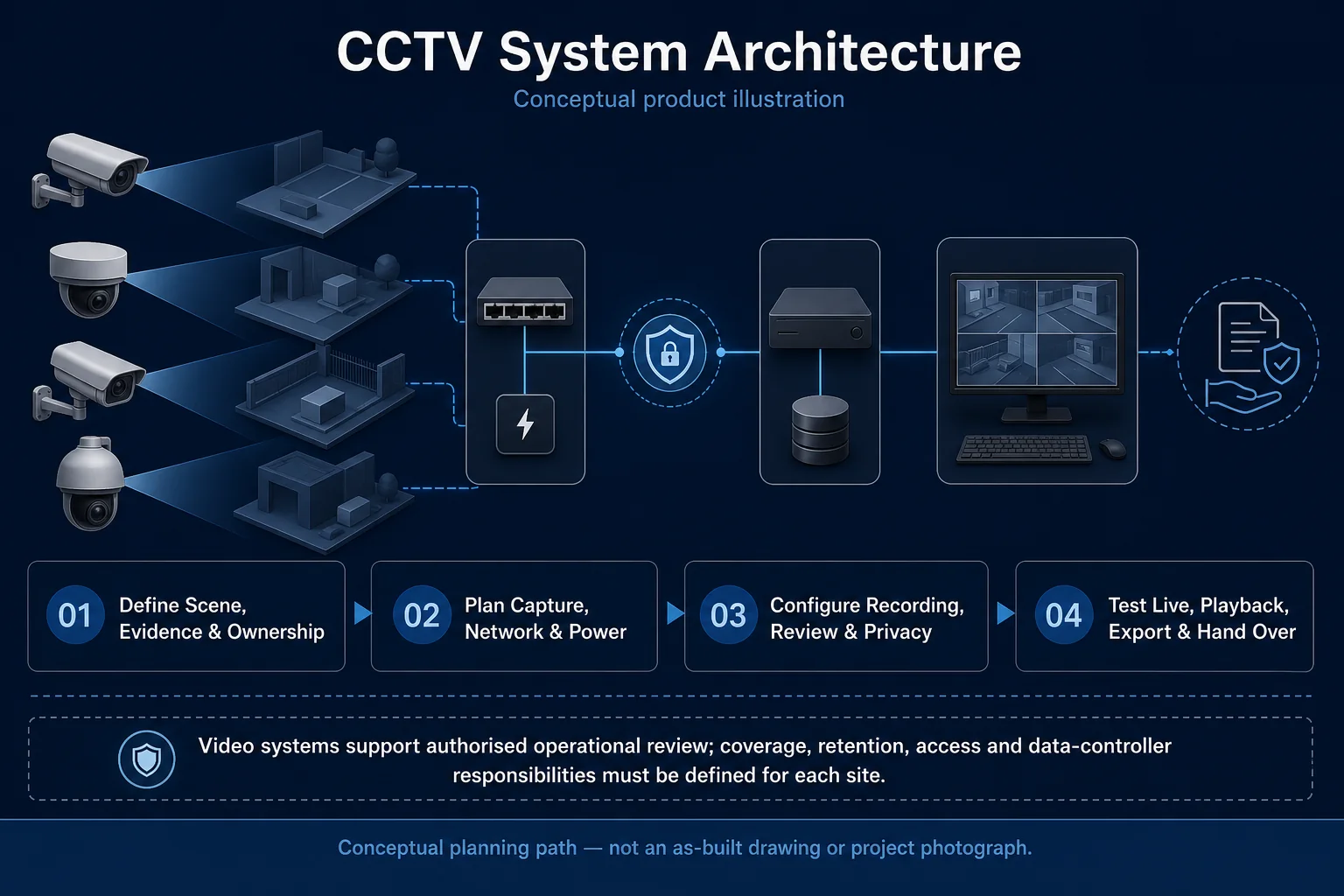
Conceptual CCTV Troubleshooting system illustration. CCTV Troubleshooting in Kuching combines the installed-system path with the stated service mode; diagnosis and corrective scope remain subject to inspection and approval. Conceptual evidence and response path for CCTV Troubleshooting in Kuching, derived from this page's scope, interfaces and acceptance record.
Conceptual planning path — not an as-built drawing or project photograph.
Before booking a service visit
Tell us the fault and your location. Diagnostic attendance, repairs, parts and any travel charges are confirmed with you before work.
Separate no video, offline status, recording gaps and remote-viewing faults into testable causes. HJ checks a known local viewing path first, then power, connections, addressing, storage and account permissions, recording what was verified and what remains unresolved.
It sits in CCTV Service under Video Surveillance. The final deliverable is shaped by the intended outcome, the installed or proposed environment and the interfaces that must be owned, supplied, integrated and tested.
When to use this page
The exact error, local versus remote behaviour, channels affected, time of failure, recent router changes and proof of authorised system access.
Typical environments to assess
Home and SME camera recording systems
Retail and warehouse sites needing retrievable incident footage
Commercial recorder upgrades with authorised maintenance windows
Engineering SOP & Handover Checklist
From the initial brief to the handover record: what to prepare, check and confirm with HJ.
01
Operational Purpose & Workflow
Separate no video, offline status, recording gaps and remote-viewing faults into testable causes. HJ checks a known local viewing path first, then power, connections, addressing, storage and account permissions, recording what was verified and what remains unresolved.
02
Pre-Attendance Evidence
The exact error, local versus remote behaviour, channels affected, time of failure, recent router changes and proof of authorised system access.
03
Diagnostic & Testing Path
Map camera signal or network streams to supported recorder inputs, storage and authorised playback. Separate capture, recording schedule, remote viewing and evidence backup responsibilities; preserve required footage before approved changes.
04
System & Responsibility Boundary
Full, unhealthy or uninitialised disks, wrong schedules, bad timestamps and excessive stream load can leave gaps despite a live image. Do not format, reset or overwrite needed evidence without the owner’s authority.
05
Acceptance & Handover Record
Document models, channels, firmware, storage health and recording schedules. Test the affected paths, timestamps, playback and authorised export, and record measured history or unresolved faults rather than a fixed retention promise.
Engineering Scope, Regulatory & Service Boundaries
Responsibility and evidence boundary
HJ coordinates assessment, engineering, installation, integration, testing and lifecycle support only for the scope recorded in the quotation. ISD handles catalogue, model, datasheet, supply and availability enquiries. Customer, consultant, builder and appointed-specialist responsibilities remain explicit.
Identity, image, credential and movement data require an authorised controller, lawful access, proportionate collection, retention rules and recorded administrator responsibility.
Installed platform, authorised ownership, parts compatibility and serviceability are checked before any repair or restoration outcome is proposed.
Related Systems, Installation & Support
See related systems, how HJ installs them, and support for equipment you already have.
Use the answers as a planning boundary; site conditions and written scope remain decisive.
Why can CCTV work locally but fail on the phone?
Local capture and remote access use different paths. Internet connectivity, router configuration, app account binding, platform support and user permissions must be checked without assuming the camera itself has failed.
What should be protected before changing CCTV storage?
Identify required evidence and authorise its export before a disk change, format or reset. Record existing limitations; replacement storage cannot restore footage that was never recorded or has already been overwritten.
What should I send HJ for CCTV Troubleshooting?
The exact error, local versus remote behaviour, channels affected, time of failure, recent router changes and proof of authorised system access. Share authorised equipment and scene information; do not send passwords or personal footage through a public form.
Need CCTV Troubleshooting? Tell HJ about your system
Tell us what the system is, what is going wrong or what you want checked. HJ will confirm the work needed, explain who is responsible for what, and agree the next step with you before any work starts.