HJ Integrated Systems · Workforce Management

Time Attendance & Workforce Management Packages

HJ Workforce starts with employee count, branches, clocking rules, shifts, overtime, leave and payroll handoff. HJ then confirms terminals, credentials, software, licence, integration, training and reporting as one defined workflow—without promising payroll until the selected module is verified.

Four HJ Workforce Levels

Choose how far the workflow goes beyond clocking

Attendance events, calculated time and payroll are different layers. The approved package names the exact software, licence, rule setup, export or integration and owner of payroll processing.

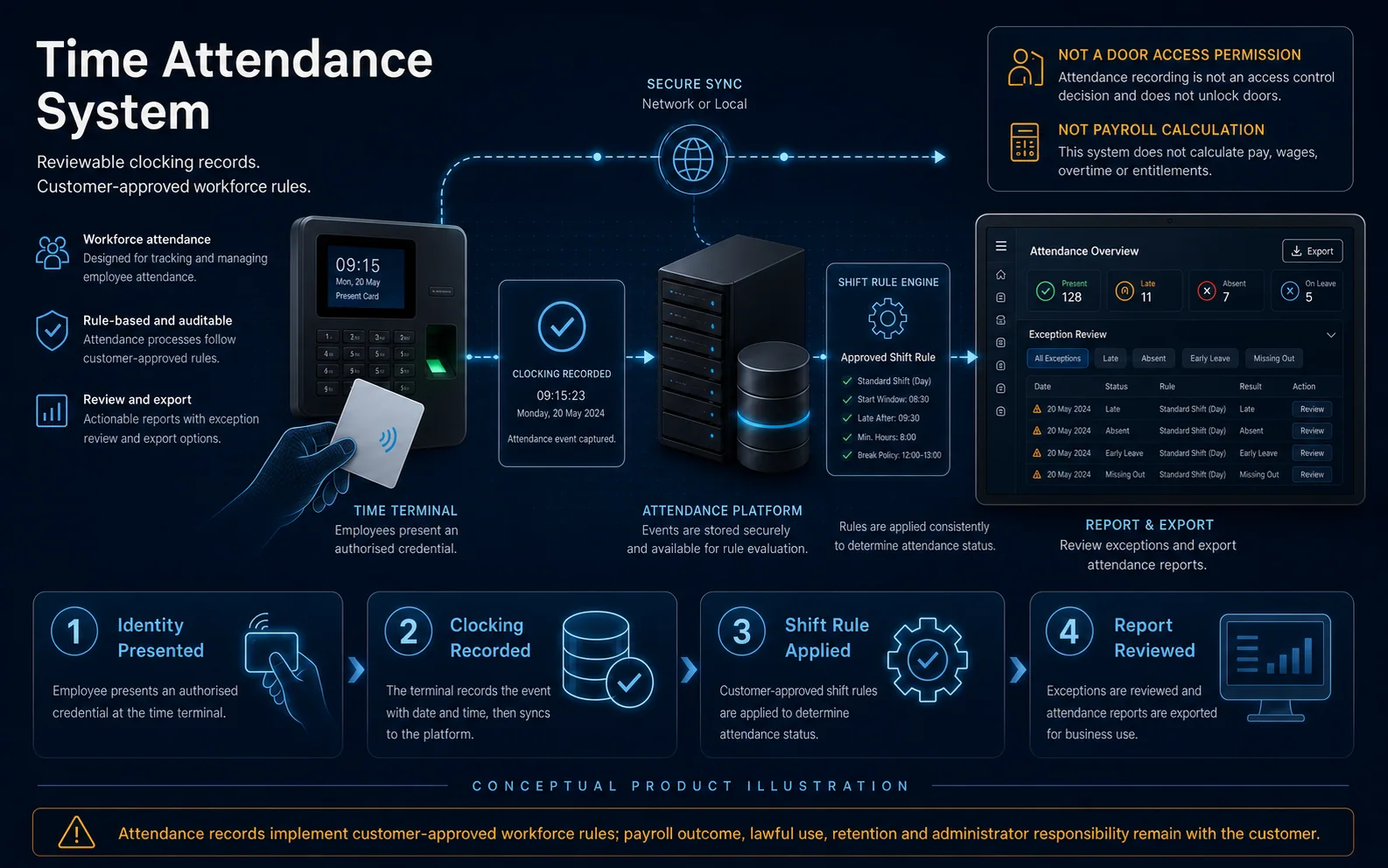
Conceptual illustration of an HJ workforce-management workflow from employee enrolment and protected attendance records through time rules, exception approval and payroll-ready export.
Conceptual illustration of a coordinated HJ workforce-management workflow. Credential method, terminals, rules, approvals, licences, payroll handoff and final scope depend on site assessment and the approved quotation; HJ does not become the payroll processor unless separately contracted.

HJ Workforce Attendance

Clock and report

Captures employee clocking events and produces verified attendance records for authorised supervisors.

Best for
Smaller businesses and sites replacing manual attendance books or isolated clocking devices.
Complete scope
Employee and terminal sizing, selected face/fingerprint/card credential, terminal installation, network where required, enrolment, basic schedules, attendance reports, tests and training.
Confirm before quotation
This level records attendance; it does not automatically calculate payroll, statutory deductions, leave entitlement or complex overtime.

HJ Workforce Time & Pay

Payroll-ready handoff

Adds confirmed time rules and an approved export or handoff toward the client payroll process.

Best for
Businesses that need clearer shift, lateness, overtime or allowance inputs before payroll is processed.
Complete scope
Attendance scope plus agreed time rules, exception review, approved reports/export, payroll-field mapping where supported, testing and administrator training.
Confirm before quotation
“Pay” means the confirmed payroll-ready workflow in the quotation. It does not claim that HJ becomes the payroll processor or that every payroll system is compatible.

HJ Workforce Complete

Employee workflow

Coordinates attendance, shifts, overtime, leave and a verified payroll module or integration where selected.

Best for
Growing organisations that need one managed workforce process rather than standalone clocking.
Complete scope
Terminals and credentials, employee groups, shift/OT/leave rules, approvals where supported, confirmed payroll module or integration, reports, roles, testing, data setup boundary and training.
Confirm before quotation
Use “Payroll Included” only after the exact module, country rules, subscription, setup, support and data responsibility are confirmed.

HJ Workforce Plus

Multi-site and mobile

Extends the confirmed workforce platform to multi-branch, mobile or more advanced approval and reporting needs.

Best for
Multi-branch or distributed teams that require central visibility and controlled remote workflows.
Complete scope
Complete scope plus confirmed branches, mobile attendance or remote approval features, role hierarchy, central reporting, licence/subscription and rollout plan.
Confirm before quotation
Mobile attendance, GPS, geofencing, cloud hosting, privacy controls and branch synchronisation vary by platform and must be explicitly approved.
Fast Comparison

Compare the complete packages

Use this as a shortlist. HJ confirms quantities, exact products and system limits after site assessment.

Comparison table for Time Attendance & Workforce Management Packages
PackageBest forComplete system scopeConfirm first
HJ Workforce AttendanceSmaller businesses and sites replacing manual attendance books or isolated clocking devices.Employee and terminal sizing, selected face/fingerprint/card credential, terminal installation, network where required, enrolment, basic schedules, attendance reports, tests and training.This level records attendance; it does not automatically calculate payroll, statutory deductions, leave entitlement or complex overtime.
HJ Workforce Time & PayBusinesses that need clearer shift, lateness, overtime or allowance inputs before payroll is processed.Attendance scope plus agreed time rules, exception review, approved reports/export, payroll-field mapping where supported, testing and administrator training.“Pay” means the confirmed payroll-ready workflow in the quotation. It does not claim that HJ becomes the payroll processor or that every payroll system is compatible.
HJ Workforce CompleteGrowing organisations that need one managed workforce process rather than standalone clocking.Terminals and credentials, employee groups, shift/OT/leave rules, approvals where supported, confirmed payroll module or integration, reports, roles, testing, data setup boundary and training.Use “Payroll Included” only after the exact module, country rules, subscription, setup, support and data responsibility are confirmed.
HJ Workforce PlusMulti-branch or distributed teams that require central visibility and controlled remote workflows.Complete scope plus confirmed branches, mobile attendance or remote approval features, role hierarchy, central reporting, licence/subscription and rollout plan.Mobile attendance, GPS, geofencing, cloud hosting, privacy controls and branch synchronisation vary by platform and must be explicitly approved.
Workforce-Data Blueprint

How clocking events become reviewed attendance and approved output

Attendance, Time & Pay, Complete and Plus use different verified modules. Payroll, leave, mobile attendance and multi-branch functions must be confirmed for the selected platform.

HJ workforce blueprint connecting employee enrolment and selected clocking terminals to attendance software, shift rules, approvals, reports and optional payroll integration.
System core / coordination layerWorkforce Platform & Rules

Attendance · schedules · approvals · reporting

Main path coordinated in the system design Where specified only when confirmed in scope Central module control, management or coordination—not always one physical device

Select a numbered system below to open the matching solution explanation.

  1. 01Face, Fingerprint or Card Clocking TerminalsSelected attendance capture methodWhere specifiedSee this solution explanation →
  2. 02Employee Identity & EnrolmentApproved employee records and credentialsSee this solution explanation →
  3. 03Network, Branches or Supported Mobile AttendanceRemote or multi-branch event pathWhere specifiedSee this solution explanation →
  4. 04Schedules & Shift RulesExpected attendance calculation rulesSee this solution explanation →
  5. 05OT, Leave & Exception RulesSupported time and exception workflowWhere specifiedSee this solution explanation →
  6. 06Supervisor Roles & ApprovalsAuthorised review workflowWhere specifiedSee this solution explanation →
  7. 07Attendance Reports & Approved ExportAuthorised attendance outputSee this solution explanation →
  8. 08Verified Payroll Module or IntegrationApproved export or confirmed integrationWhere specifiedSee this solution explanation →

Scope note: Conceptual architecture. Employee, branch and terminal counts, credential method, licences, mobile attendance, approvals and payroll integration are confirmed before quotation.

Diagram to Installation

Open the installation pages represented in this system diagram

Each page below highlights only the nodes it covers, explains its role in the complete Solution and returns to the exact numbered point in this diagram.

Operational Design

Define people, rules, exceptions and data ownership

A terminal can record a time, but the organisation must still define what that event means and who may correct or approve it.

Identity, Enrolment & Terminals

Capture

Selects credential method and terminal locations around actual employee flow.

Best for
Reliable clocking without queues or shared credentials.
Complete scope
User count, face/fingerprint/card method, enrolment owner, fallback and terminal capacity/location.
Confirm before quotation
Biometric privacy, consent, retention and employment policy remain the employer’s responsibility.

Shifts, OT, Leave & Exceptions

Interpret

Translates approved company rules into supported system settings and an exception-review process.

Best for
Sites with rotating shifts, grace periods, breaks, overtime or leave.
Complete scope
Rule workshop, supported configuration, sample scenarios, exception handling and sign-off.
Confirm before quotation
The software configuration does not replace HR, payroll, tax or legal advice; the employer approves every rule.

Reports, Payroll Handoff & Support

Use the data

Defines who reviews attendance, exports or integrates data, runs payroll and maintains employee records.

Best for
Preventing gaps after the terminals are commissioned.
Complete scope
Authorised roles, reports/export, integration boundary, backup expectations, training and support plan.
Confirm before quotation
Data migration, historical cleanup, custom integration and payroll processing are included only when named.
Verified Scope

Project proof without invented package claims

A named Workforce case will be linked only after publishable employee count, terminal scope, software workflow and commissioned result are verified.

No exact public proof attached

No public named Workforce case attached

The current public portfolio does not verify attendance, payroll or workforce-management scope. HJ therefore leaves this proof section unpaired.

Open the honest project filter →
Clear Responsibility

HJ delivers the system package; ISD maintains the product catalogue

The two routes work together without duplicating product ownership.

HJ complete installed package

  • Site assessment and functional design
  • System sizing and compatible equipment selection
  • Cabling, mounting, power and network coordination
  • Configuration, integration and commissioning
  • User handover, maintenance and support options

ISD models and supply

  • Individual model and SKU catalogue
  • Datasheets and product specifications
  • Availability, supply and product-only enquiries
  • Brand and component catalogue navigation
  • No duplicate claim that HJ is a retail catalogue
Clear Answers

Package selection questions

Use these answers to confirm the system boundary before model selection or quotation.

Is time attendance the same as payroll?

No. Attendance captures clocking events; time rules interpret them; payroll applies approved pay, deductions and statutory rules. An HJ package includes only the layers named in the quotation.

When can HJ say Payroll Included?

Only after the exact payroll module or integration, country configuration, licence, setup, data ownership, testing and support boundary are confirmed.

Can employees clock in by face, fingerprint or card?

Yes when the selected terminal and workplace policy support the method. Capacity, queue speed, fallback, hygiene, privacy and enrolment quality must be assessed.

Does Workforce Plus include mobile attendance?

Only when the selected platform supports it and the quotation names the App, subscription, GPS/geofence rules, privacy controls and approved users.

Terminology checked against Hikvision Access Control products. Exact current models, regional availability and supply remain subject to the ISD catalogue.