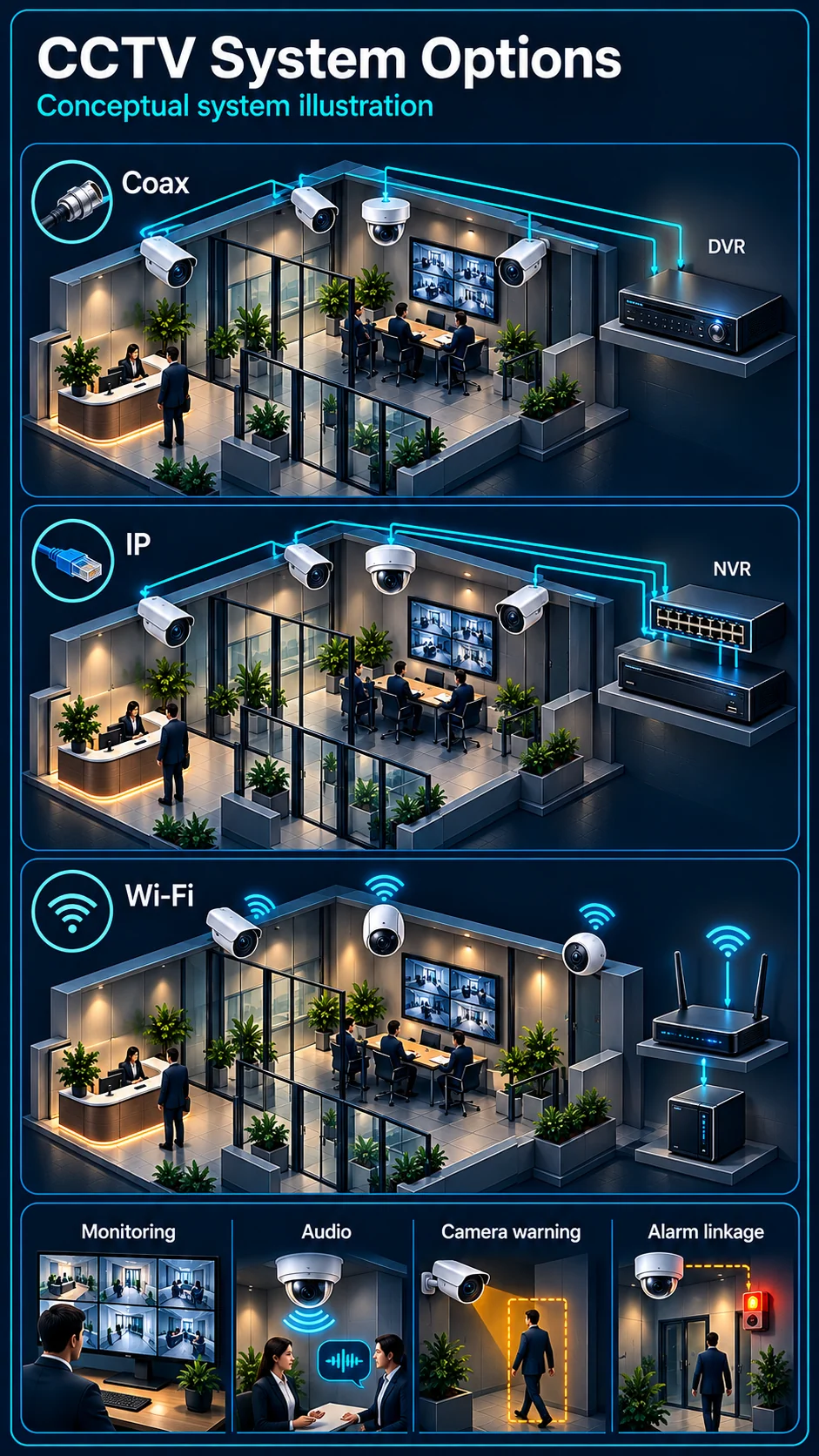
Architecture
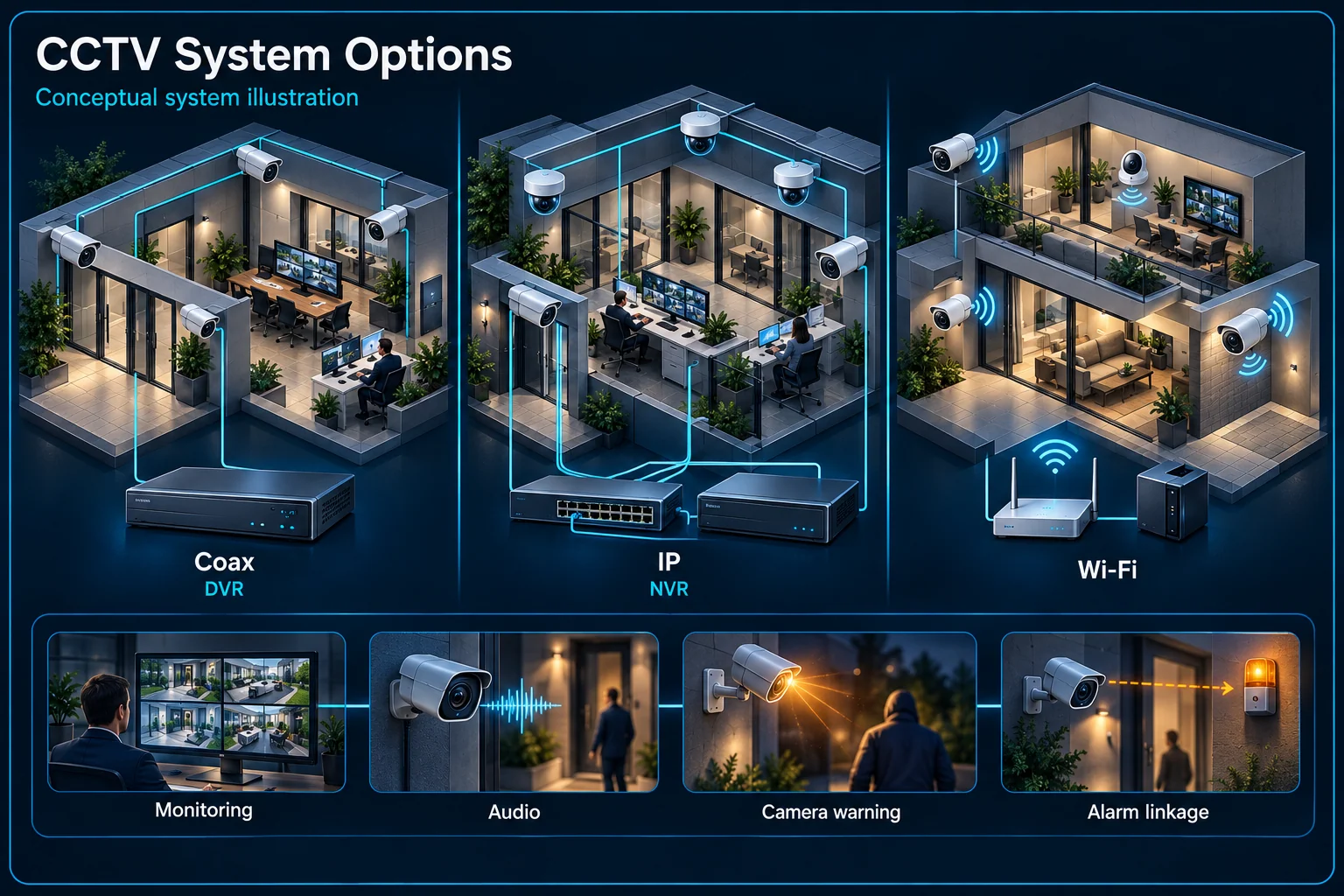
Analog / DVR, IP / NVR / PoE and Wi-Fi describe connection and recording design.
Choose the recording and response workflow before the camera count. HJ combines capture, transmission, storage and authorised viewing, with analytics, audio or thermal sensing only where selected and verified for the site.
HJ Security · Kuching & Sarawak
Use the comparison to choose what you want to understand, then open its detail page. The total system blueprint stays here while each plan, function and architecture answers its own customer question.
Each route leads to a dedicated explanation rather than a single generic installation page.
Wired, IP or Wi-Fi guide
Named reference scope
Rules and dependencies
Site routines and response
Existing enquiry workflow
Analogue, IP and Wi-Fi choices describe how equipment connects. Recording, two-way talk, camera warning and an independent alarm scope need their own function and inclusion checks.
Pro is the IP family; Defence adds the defined independent alarm equipment. Plus is a specified upgrade direction, not proof that every input supports every event or an unmeasured performance improvement.
A plan page explains its reference scope. A feature page explains the operating principle and conditions. A site solution explains where and when those functions may be useful.
The installation service describes delivery and acceptance. An enquiry shares the topic you want to discuss with HJ; it does not confirm a final specification or send a message merely by browsing.
No. The table is a summary. Open the relevant function or plan page for its workflow, conditions, visual explanation and acceptance checks.
No. Included equipment, a device's supported capability and a demonstrated site configuration are different facts and should be recorded separately.
Choose your site, connection architecture and response needs without treating Wi-Fi, Pro and Plus as one upgrade ladder.
Analog / DVR, IP / NVR / PoE and Wi-Fi describe connection and recording design.
Essential records; Interactive adds the specified audio; Proactive adds camera warning; Defence adds separate alarm equipment.
A specified processing and event-channel upgrade, with optional external response equipment. Exact models and supported functions must be confirmed.
HJ ActiveGuard is the umbrella name for HJ video-security solutions, not an extra technical tier. Visible–thermal and hybrid designs describe specialist architectures, not replacements for the named reference plans.
Choose the response you need, then confirm architecture and exact equipment. Pro is an IP family, not a higher step after Defence.
These are HJ reference-plan scopes, not a claim that every model in a family has every function. Equipment included, supported device functions and site commissioning are recorded separately.
Swipe across the table to compare every column.
| Plan | Architecture | Human detection | Microphone | Two-way talk | Camera siren | Warning light |
|---|---|---|---|---|---|---|
| Essential | Analog / DVR | By camera / recorder and mode | Not in listed reference models | Not in listed reference models | Not in reference plan | Not in reference plan |
| Wired Interactive | Analog / DVR | By camera / recorder and mode | In reference plan | In reference plan | Not in reference plan | Not in reference plan |
| Proactive | Analog / DVR | By camera / recorder and mode | In reference plan | In reference plan | In reference plan | In reference plan |
| Proactive Defence | Analog / DVR | By camera / recorder and mode | In reference plan | In reference plan | In reference plan | In reference plan |
| Essential Pro | IP / NVR / PoE | By camera / recorder and mode | By selected model | Not in listed reference models | Not in reference plan | Not in reference plan |
| Interactive Pro | IP / NVR / PoE | Camera-side on specified models | In reference plan | Not listed; listen-in only | Not in reference plan | Not in reference plan |
| Proactive Pro | IP / NVR / PoE | Camera-side on specified models | In reference plan | In reference plan | In reference plan | In reference plan |
| Proactive Defence Pro | IP / NVR / PoE | Camera-side on specified models | In reference plan | In reference plan | In reference plan | In reference plan |
| Wireless / Wi-Fi | Wi-Fi | By camera / recorder and mode | By selected model | By selected model | By selected model | By selected model |
Swipe across the table to compare every column.
| Plan | Alarm panel | Keypad | Independent siren | Camera-to-alarm linkage |
|---|---|---|---|---|
| Essential | Separate option | Separate option | Separate option | Not in reference scope |
| Wired Interactive | Separate option | Separate option | Separate option | Not in reference scope |
| Proactive | Separate option | Separate option | Separate option | Not in reference scope |
| Proactive Defence | AX HYBRID PRO reference | In Defence reference scope | Separate wired siren box | Configure and demonstrate |
| Essential Pro | Separate option | Separate option | Separate option | Not in reference scope |
| Interactive Pro | Separate option | Separate option | Separate option | Not in reference scope |
| Proactive Pro | Separate option | Separate option | Separate option | Not in reference scope |
| Proactive Defence Pro | AX HYBRID PRO reference | In Defence reference scope | Separate wired siren box | Configure and demonstrate |
| Wireless / Wi-Fi | Separate option | Separate option | Separate option | Not in reference scope |
Interactive Pro records sound with a microphone; it is not the same as Proactive Pro two-way talk. Wired Interactive has its own supported talk-back models. The listed Essential / Essential Pro reference models do not include two-way talk; a different requested SKU needs separate confirmation. Wireless sirens vary by exact model. PIR and door contacts are not automatically included in the Defence reference scope.
Compare three upgrade directions. Camera warning, an independent alarm system and electric fencing are different protection layers.
Swipe across the table to compare every column.
| Plan | Base scope | Processing / channel upgrade | Alarm system | External response options | Electric fence |
|---|---|---|---|---|---|
| Proactive Plus | Proactive | Specified IP-side processing; models and event channels to confirm | Not automatically included | Air Horn / additional strobe: optional | Not included |
| Proactive Defence Plus | Proactive Defence | Specified IP-side processing; models and event channels to confirm | Panel + keypad + independent siren; linkage test required | Air Horn / additional strobe: optional | Not included |
| Proactive Defence Plus + Electric Fence | Proactive Defence Plus | Specified IP-side processing; models and event channels to confirm | Panel + keypad + independent siren; linkage test required | Air Horn / additional strobe: optional | Independent fence system and site design |
The specified upgrade may change the processing device, supported event channels and compatible response interfaces. Retaining analog cameras may require a compatible hybrid recorder, added IP devices or camera replacement. The quotation must identify the actual changes.
Air Horn and additional strobe light are optional equipment, not air-conditioning controls. A separate electric fence needs its own energizer, fence design, safety review, monitoring and commissioning; it is not a camera feature.
A 4CH, 8CH or 16CH recording label does not tell you how many channels can analyse a particular event or trigger an alarm panel.
Swipe across the table to compare every column.
| System size | Non-Pro DVR reference | Documented reference function | Pro design target | Requested difference | Confirmation status |
|---|---|---|---|---|---|
| 4CH | iDS-7204HQHI-M1/XT | 2 recorder-side perimeter channels | Exact event capacity to confirm | Not published without matched evidence | Pro camera / recorder, exact event and firmware to confirm |
| 8CH | iDS-7208HQHI-M1/XT | 4 recorder-side perimeter channels | Exact event capacity to confirm | Not published without matched evidence | Pro camera / recorder, exact event and firmware to confirm |
| 16CH | iDS-7216HQHI-M2/XT | 8 recorder-side perimeter channels | Exact event capacity to confirm | Not published without matched evidence | Pro camera / recorder, exact event and firmware to confirm |
The referenced HQHI recorders distinguish Motion Detection 2.0 on their 4 / 8 / 16 analog inputs from 2 / 4 / 8 perimeter-analysis channels. These are different processing budgets. Firmware, enabled AI mode and enhanced-IP operation may affect which functions coexist. No accuracy or stability improvement is inferred from channel counts.
Swipe across the table to compare every column.
| Function to confirm | What the design must record |
|---|---|
| Human / vehicle motion classification | Exact camera-side or recorder-side engine, active input channels and operating mode. |
| Line Crossing Detection | Exact device, direction, line, target filter, schedule and supported event channels. |
| Intrusion Detection | Exact device, area rule, timing, target filter, schedule and supported event channels. |
| Camera event → alarm system | Supported event path, interface, panel configuration, arming state and demonstrated siren output. |
IP / Pro camera-side classification and NVR-native analysis are separate capabilities. An NVR input label is not its analytics budget. Any 2→4, 4→8 or 8→16 comparison must name the same function on both sides. It does not establish 50% better recognition or reliability. Already-supported Pro camera functions are not downgraded by this comparison.
Select only what matters to you. Your reference plan and requested options continue into the existing HJ enquiry process.
These are HJ complete-system packages. Exact models, quantities and retention are confirmed only after the existing cabling, viewing angle, lighting, response workflow and evidence requirement are surveyed.
Retains suitable analogue infrastructure while adding compatible IP video and selected active-deterrence zones where a staged upgrade is practical.
Uses IP video, intelligent event rules and selected automatic warnings to help an operator detect, verify and respond to activity in configured zones.
Coordinates visible and thermal sensing with verified analytics and response devices for earlier perimeter awareness in demanding scenes.
Provides practical live view, recording, playback and remote access for standard day-to-day monitoring.
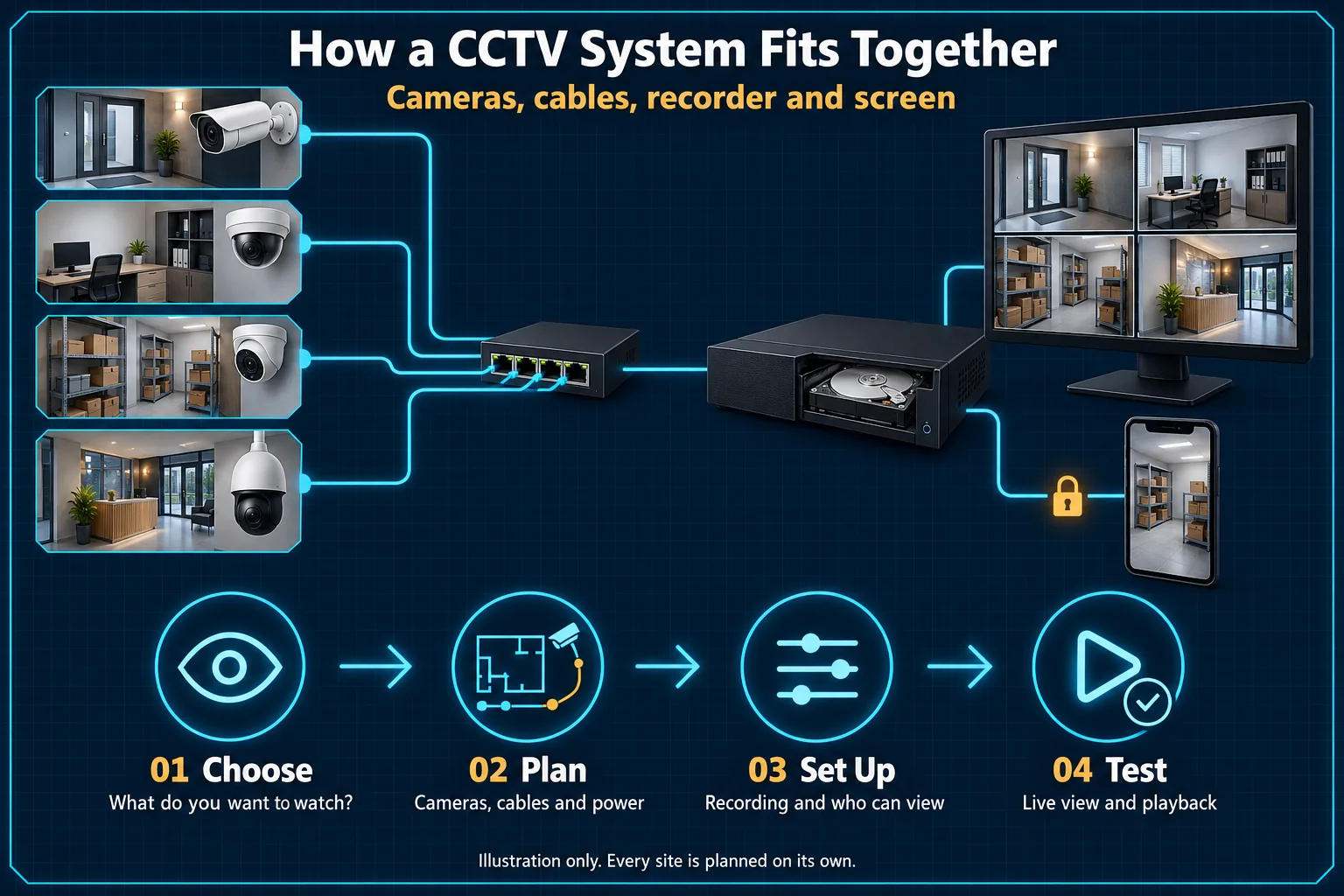
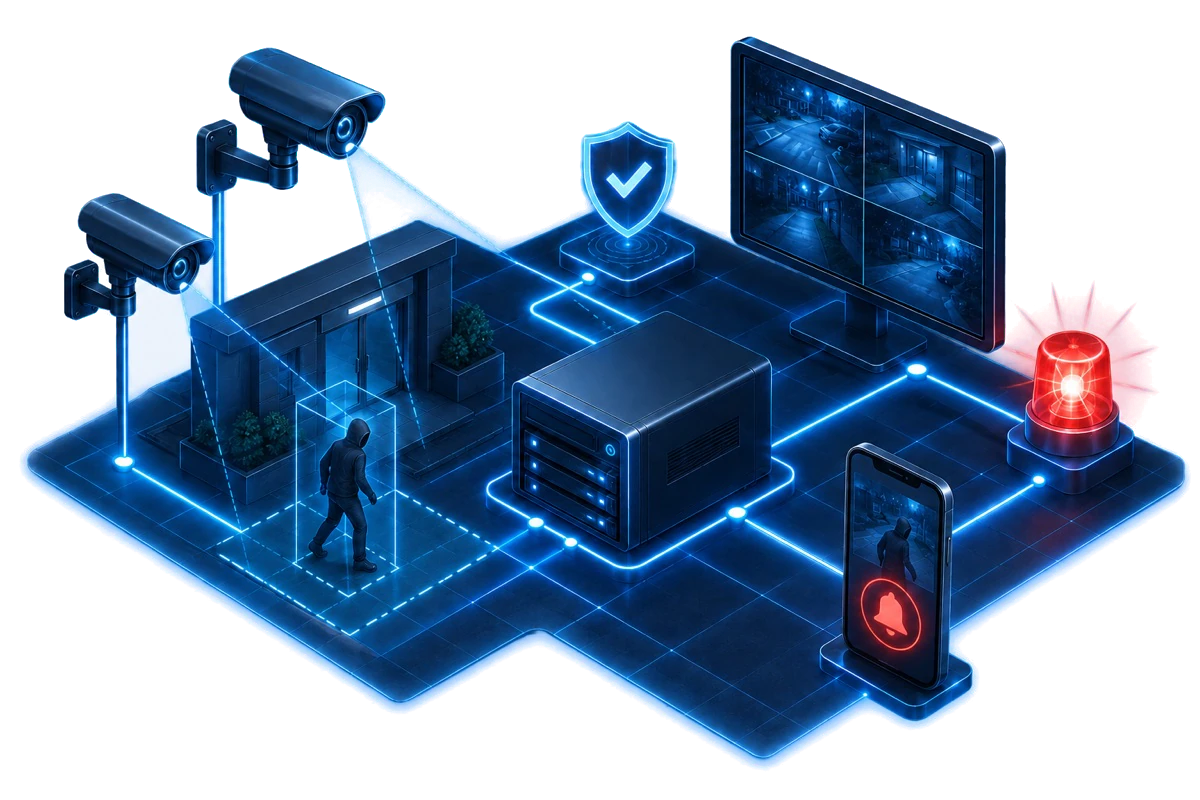
Camera capture, transmission, recording, storage and authorised viewing must be designed together. Analytics, command displays and active response appear only when selected and commissioned.

DVR · NVR · VMS selected for the approved architecture
Select a numbered system below to open the matching solution explanation.
Scope note: Illustration only. Camera count, resolution, lens, recorder, retention, analytics and active-response functions are confirmed after a site survey.
Each page below highlights only the nodes it covers, explains its role in the complete Solution and returns to the exact numbered point in this diagram.
Highlighted diagram pathCamera Capture Network & PoE Storage & Retention
Camera placement, transmission, recording and retention are surveyed, installed and commissioned as one CCTV scope.
Highlighted diagram pathCamera Capture Detection Rules
Hikvision camera, recorder and selected analytics choices sit inside the wider video-security architecture; features remain model- and scope-dependent.
Highlighted diagram pathCommand Display Remote Viewing Storage & Retention
HikCentral and command-centre work cover operator display, authorised management and multi-site event workflows around the recording platform.
These capabilities can overlap, but they are not interchangeable. HJ records which camera or zone supplies each function in the final system design.
IP/network or TurboHD/analogue; turret, dome, bullet, fixed, varifocal, PT/PTZ or panoramic according to the scene.
Infrared, ColorVu/full-colour and Smart Hybrid Light serve different night scenes and lighting policies.
Person Detection, vehicle classification, line crossing and intrusion zones can reduce irrelevant motion alerts and speed up review.
A built-in microphone captures authorised audio; two-way audio adds a speaker and live talk-back on compatible equipment.
A complete package must preserve and retrieve evidence—not merely show a live image during handover.
Recording capacity is calculated from camera count, resolution, frame rate, bitrate, schedule and required retention.
Authorised users can view, receive selected events and review footage remotely through the configured platform.
Combines multiple sites, users, cameras and events into a managed platform and command-centre workflow.
These cases verify that HJ has delivered CCTV scope. They do not prove a specific camera model, resolution, Live Guard function or package unless that detail is published on the case page.
Public scope confirms CCTV and door access at sites in Kuching, Sibu and Miri.
View verified project scope →Public scope confirms CCTV alongside retail security and communication systems.
View verified project scope →Planning an installed system? HJ handles the site survey, installation and handover. For individual models and product-only supply enquiries, browse ISD.
Use these answers to confirm the system boundary before model selection or quotation.
No. Smart Hybrid Light describes infrared, white-light and smart supplemental-light modes. Automatic strobe/audio warning and two-way audio are separate capabilities available only on selected models.
Hybrid means an intentional analogue + IP system architecture, normally used for a compatible staged upgrade. Smart Hybrid Light is a camera illumination feature and is not the same thing.
No. Two-way audio provides live talk-back. Active deterrence uses an automatic configured response such as sound-and-light warning after a qualifying event. A complete package may use both on selected supported devices.
Thermal-ready means the design reserves a compatible path for future thermal equipment. Visible–thermal fusion means visible and thermal sensing are both installed, integrated and commissioned in the response workflow.
No. Resolution is one input. Commercial evidence also depends on lens and viewing distance, WDR and low-light performance, recording retention, network reliability, user permissions, search workflow and maintenance.
HJ supplies a complete installed system matched to the site. Camera count, storage and exact models are confirmed after the coverage and retention requirement are checked; product-only model and stock enquiries go to ISD.
Terminology checked against Hikvision Smart Hybrid Light and Hikvision AcuSense and Axis audio for security. Exact current models, regional availability and supply remain subject to the ISD catalogue.