Installation package
Wi-Fi CCTV and Alarm Integration Planning in Kuching
Wi-Fi CCTV and a separate wireless alarm can support the same property's security routine, but that does not make them one automatically linked product. This plan distinguishes seeing activity, verifying an alarm with video and transferring a camera event into an alarm controller. The desired relationship must be selected before compatibility is assessed.
How this package fits together
Wi-Fi CCTV with an Independent Alarm Canvas
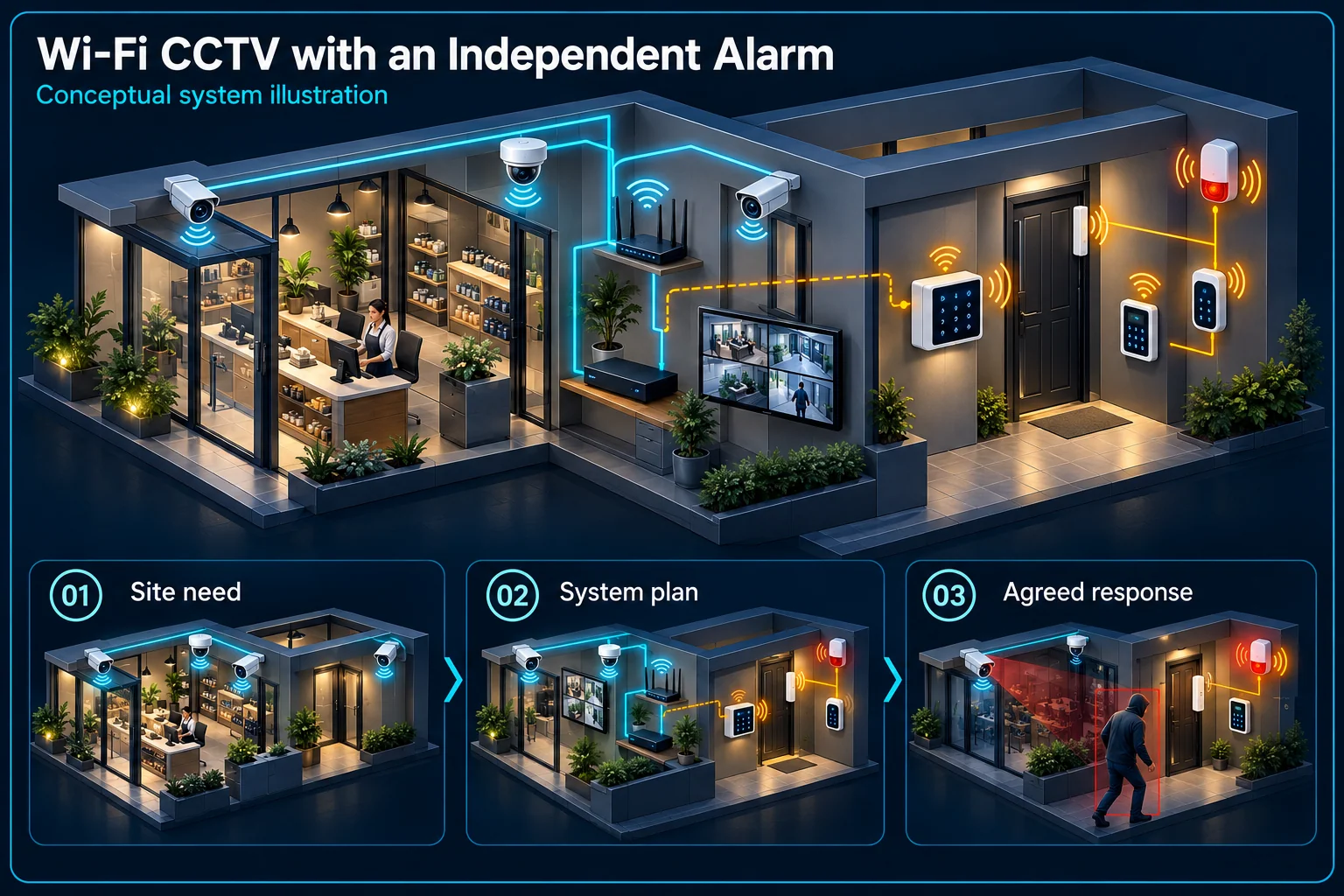
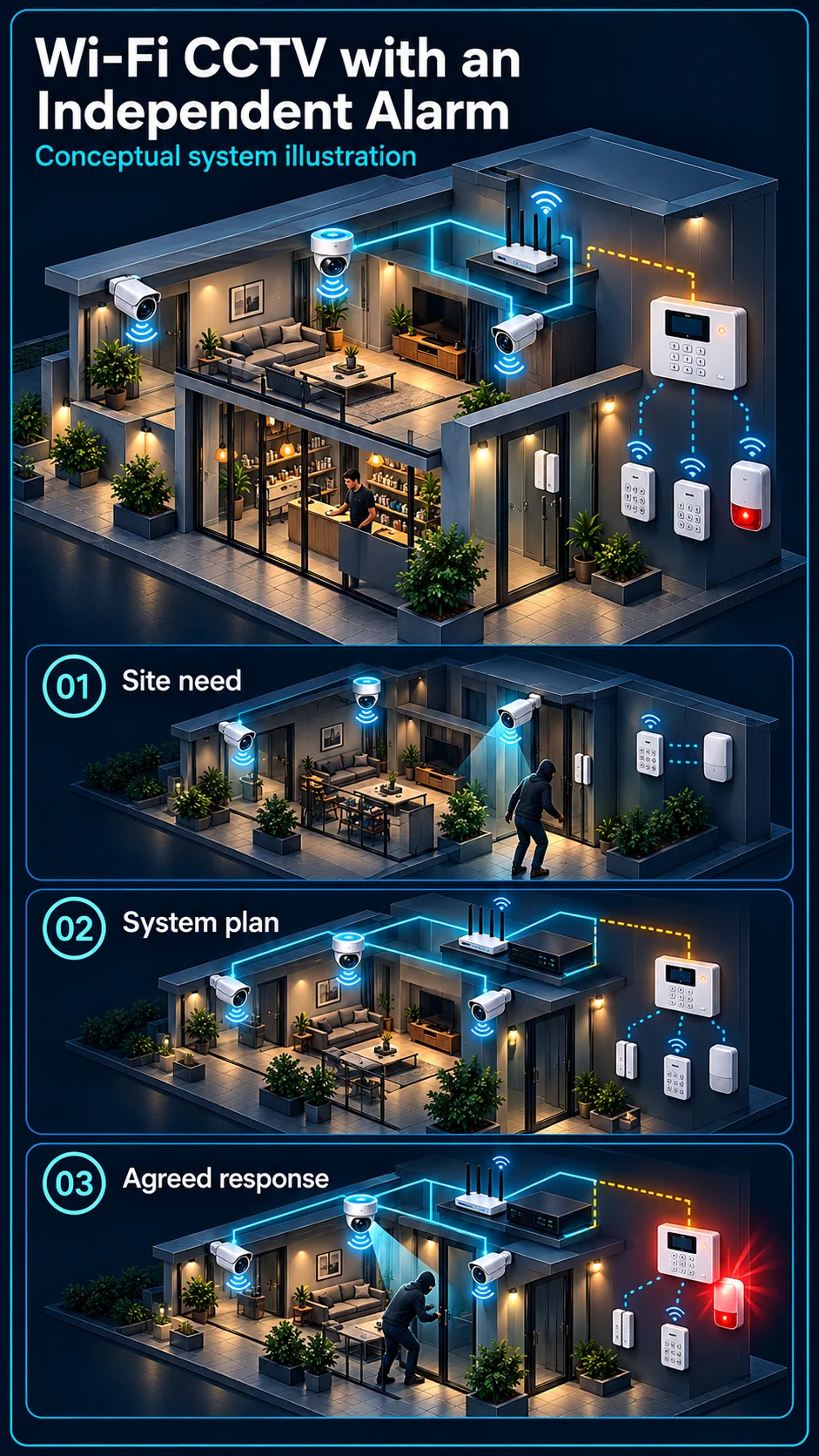
System planning notes
Parallel camera and alarm paths, with a conditional bridge
Video verification and automatic event transfer are drawn as different actions.
- Solid line: illustrated functional path or agreed test route.
- Dashed line: optional device or compatibility to confirm.
- Solid paths show the separate monitoring and alarm workflows.
- The dashed bridge is not supplied or working merely because both products are present.
Actual model, supply and storage
A person checks the relevant scene
Own locations and detection scope
Arming logic and user control
Selected siren and notifications
Only with confirmed compatibility
- E1: Wi-Fi camera and recording → Authorised video reviewView and verify
- E2: Selected alarm detectors → Wireless alarm controllerAlarm detection
- E3: Wireless alarm controller → Independent alarm outputConfigured alarm response
- E4: Wi-Fi camera and recording → Optional event bridgeEvent transfer to assess — optional / compatibility to confirm
- E5: Optional event bridge → Wireless alarm controllerCompatible configured path — optional / compatibility to confirm
Begin with two understandable systems
Camera monitoring and recording
The selected camera needs suitable power, Wi-Fi coverage and a supported recording arrangement. Its microphone, speaker and warning functions depend on the full SKU. Keep the camera account and clip-review process clear to the people who use them.
Independent alarm detection and control
The alarm controller and selected detectors follow their own arming and output design. Specify the detector locations, user control and siren scope. The presence of a camera does not replace an agreed alarm-detector requirement without an explicit design decision.
Choose the type of coordination
Parallel use and video verification
A user may receive an alarm and open the relevant camera view to understand the situation. This can be a useful operating procedure even without automatic event transfer. Agree who reviews it and how they find the correct view.
Automatic event linkage is another scope
Passing an event into the panel requires a specifically supported device, platform or interface path. Matching brands, app access or a camera siren do not prove interoperability. Confirm configuration, armed-state behaviour and any relevant service dependency.
Make the daily routine practical
Home, away and permitted access
Decide which alarm areas are armed and which camera responses remain active during family activity, deliveries or late staff access. Document how to pause and restore exceptions. Avoid making every movement in the view sound an independent siren.
Consider power and internet separately
Camera local recording, alarm operation and remote phone notifications can have different dependencies. Identify supplies and any approved backup-power scope for each. Neither wireless radio nor Wi-Fi should be described as a guarantee of uninterrupted operation.
Verify only the workflow actually included
Test each system on its own
Check camera view and playback, alarm detection, arming controls and the agreed outputs individually. Use the nominated user accounts. This establishes useful basic operation before attempting to prove a coordinated event route.
Then demonstrate any approved linkage
If automatic transfer is included, trigger the defined event and verify panel receipt, arming condition, response and reset. For manual video verification, practise opening the correct view. Record which arrangement was accepted instead of describing both as integration.
Questions about Wi-Fi CCTV with an Independent Alarm
Will an EZVIZ camera automatically trigger an alarm panel?
No universal linkage is assumed. The exact camera, alarm equipment, platform and configured path must support the intended behaviour and be demonstrated.
Can the camera and alarm simply be used side by side?
Yes. Parallel operation with a clear video-review routine is different from automatic event transfer. The scope should say which arrangement the customer is receiving.
Does a camera siren replace the alarm siren?
Not automatically. They are different devices and control paths. Coverage, arming behaviour and the desired independent output must be reviewed for the property.