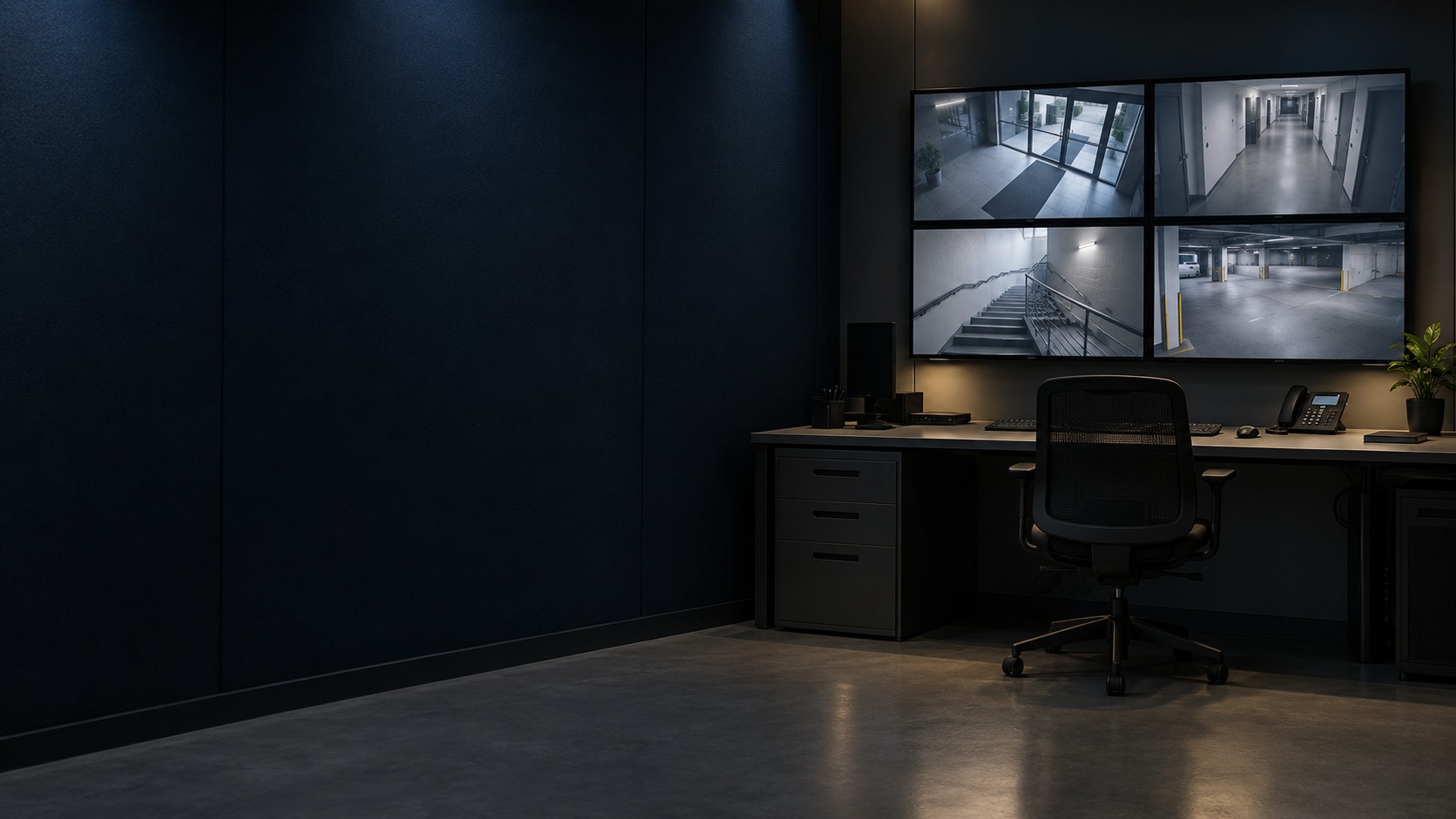
Central-security operator workstation and displays (illustration)

CCTV / Alarm / Access Integration in Kuching & Sarawak

Link selected CCTV, alarm and access events into a clear operator workflow. HJ agrees which event calls up which camera or record, which actions are permitted, and how exceptions are handled. Supported device/platform combinations and licences are confirmed; a shared brand name does not guarantee automatic compatibility.

System selection and integration guideIntegration Platform
IntegrationCCTV / Alarm / Access Integration
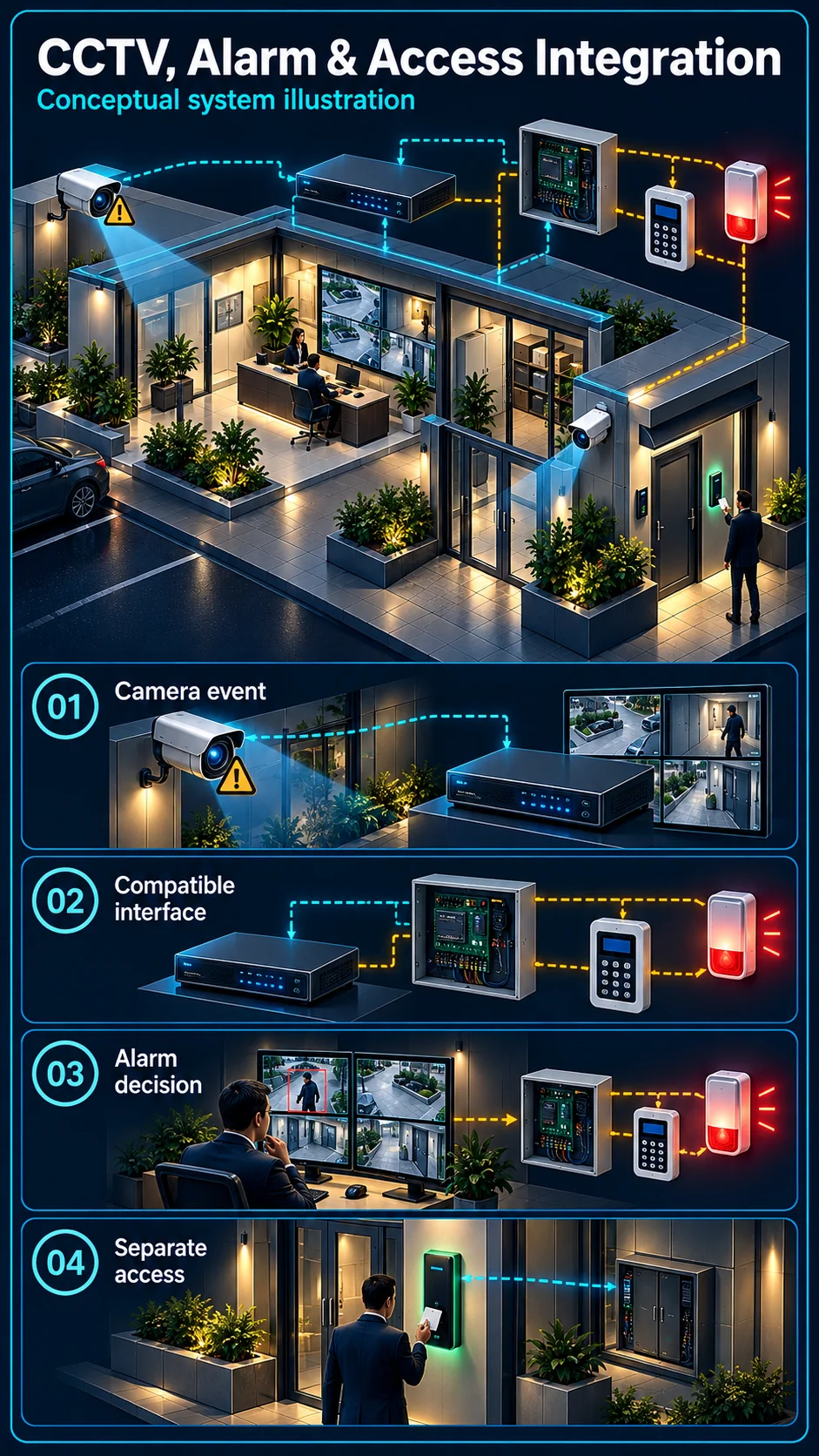
CCTV, Alarm and Access Integration system diagram
  1. 01CCTV / Alarm / Access Integration
  2. 02Site fit, interfaces and verification
  3. 03Field interface
  4. 04normal data or event exchange
Conceptual CCTV / Alarm / Access Integration product and system illustration.
Illustration & scope boundary

Conceptual CCTV / Alarm / Access Integration product and system illustration for Integration. Final device form, model, interfaces and quantities are confirmed from the assessed scope and approved product data. Conceptual sense, decide and control loop for CCTV / Alarm / Access Integration, derived from this page's scope, interfaces and acceptance record.

Conceptual planning path — not an as-built drawing or project photograph.

System feature

CCTV, Alarm & Access Integration

An integrated installation needs an agreed event path between systems, not just cameras and an alarm controller in the same building. HJ defines the initiating event, compatible interface, armed logic and required output. Door access and other existing integration roles remain separate parts of the wider design.

CCTV, Alarm & Access Integration Canvas

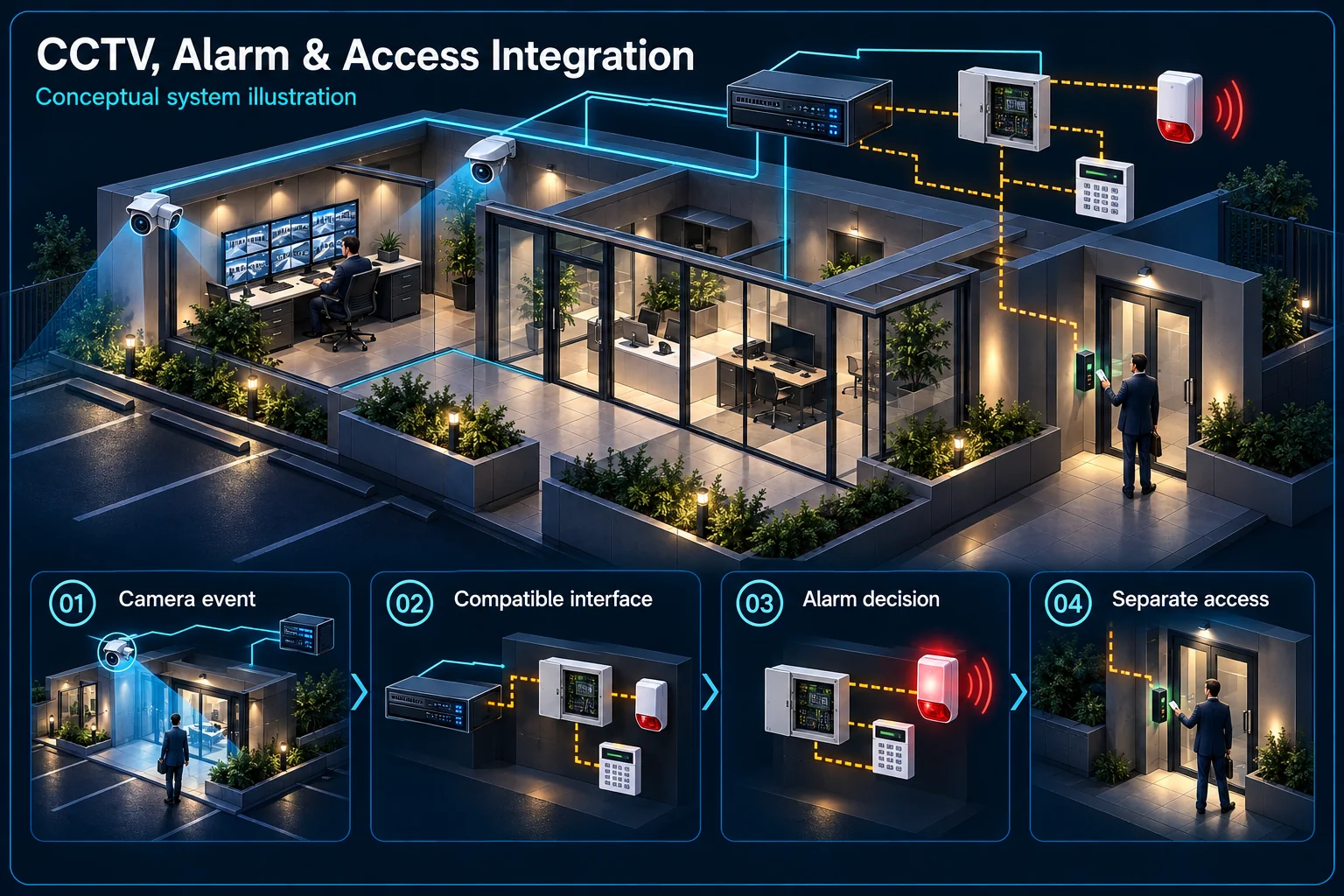
CCTV / Alarm / Access Integration in Kuching & Sarawak – system diagram
Conceptual system illustration. Final configuration depends on the approved site scope.View full-size desktop imageView full-size mobile image
System planning notes

Record the event path and the alarm decision separately

Dashed connections are proposed interfaces until compatibility, configuration and testing have been accepted.

Record the event path and the alarm decision separatelyDashed connections are proposed interfaces until compatibility, configuration and testing have been accepted.E1E2E3E401Camera event02Compatible interface03Alarm control logic04Selected output05Access controllerRecord the event path and the alarm decision separatelyDashed connections are proposed interfaces until compatibility, configuration and testing have been accepted.E1E2E3E401Camera event02Compatible interface03Alarm control logic04Selected output05Access controller
  • Solid line: illustrated functional path or agreed test route.
  • Dashed line: optional device or compatibility to confirm.
  • Installed hardware does not prove a commissioned event linkage.
  • Each system retains its own permissions, power and support boundary.
Camera event

Supported rule and target

Compatible interface

Exact path to be confirmed

Alarm control logic

Zone, armed state and response

Selected output

Independent siren or agreed action

Access controller

Own permissions and safety role

Read the connections
  1. E1: Camera event → Compatible interfaceProposed event transfer — optional / compatibility to confirm
  2. E2: Compatible interface → Alarm control logicSupported received event — optional / compatibility to confirm
  3. E3: Alarm control logic → Selected outputAccepted output rule
  4. E4: Access controller → Alarm control logicOnly if separately approved — optional / compatibility to confirm
Conceptual system diagram. Final configuration depends on the approved site scope.

Choose the level of integration

Parallel installation is not automatic event linkage

Cameras can record while an independent alarm operates without exchanging events. Video verification can also help a user review an alarm without making the camera trigger it. Identify whether the requirement is parallel use, operator verification or a supported automatic action.

Define the event and the receiving decision

A supported line crossing or other selected event needs a defined destination. The receiving controller must interpret it in the agreed way. Describe the relevant zone, armed state and intended action, rather than labelling every connection simply integrated.

Verify the interface and system responsibilities

Compatibility needs an exact path

The arrangement may depend on a supported hardware interface or platform function. Confirm the precise devices, versions, licences where applicable and available outputs. This functional explanation is not a wiring instruction or permission to connect arbitrary camera terminals directly to an alarm controller.

Keep access control decisions explicit

An access event, a camera classification and an alarm output have different meanings. If door access participates, agree which system grants permission and what happens during faults. Do not let a camera's person label stand in for an authorised access decision.

Plan normal, armed and fault conditions

Use operating modes people can manage

Agree who arms the system, who may change the schedule and how a permitted visit is handled. A camera event during an occupied period should follow the accepted rule. Record whether a change affects one view, an alarm area or the wider system.

Review loss of network or power separately

A local recording path and an inter-system event path may have different dependencies. Identify what each system does when a link, controller or power source is unavailable. Backup scope and fault reporting require their own review rather than a general promise that integration always continues.

Prove the complete chain at handover

Test the input, decision and physical output

Generate the agreed event safely and check the received signal, armed logic and chosen output. Repeat the relevant disarmed or exception condition. A successful device login or a list of included hardware does not prove that the complete response chain has been commissioned.

Retain responsibilities and an acceptance record

Record the approved trigger, compatible path, recipients, output and reset procedure. Include who supports each separate system and any supplier dependency. Only describe a linkage as demonstrated after the actual site test has been accepted; planning content is not that evidence.

Questions about CCTV, Alarm & Access Integration

Does an included alarm panel mean the cameras already trigger it?

No. Hardware inclusion, interface compatibility, configuration and accepted site testing are separate facts. The event-to-output chain needs to be specified and demonstrated.

Does using the same brand guarantee integration?

No universal compatibility is implied. Check the complete devices, functions, versions and supported path, including any platform or licence conditions.

Can a camera event unlock a door?

Do not assume that behaviour. Any access action requires a separately agreed security and safety design, with the authorised access controller retaining its defined role.

Continue your planning

What CCTV / Alarm / Access Integration covers

Link selected CCTV, alarm and access events into a clear operator workflow. HJ agrees which event calls up which camera or record, which actions are permitted, and how exceptions are handled. Supported device/platform combinations and licences are confirmed; a shared brand name does not guarantee automatic compatibility.

It sits in Integration Platform under Integration. The final deliverable is shaped by the intended outcome, the installed or proposed environment and the interfaces that must be owned, supplied, integrated and tested.

When to use this page

Device/platform models and versions, event list, camera mapping, operator roles, network routes, licences and approved action rules.
Typical environments to assess

  • Security desks coordinating video and access events.
  • Approved alarm-to-camera workflows.
  • Supported mixed or single-platform security integrations.

Engineering SOP & Handover Checklist

From the initial brief to the handover record: what to prepare, check and confirm with HJ.

01

Operational Purpose & Workflow

Link selected CCTV, alarm and access events into a clear operator workflow. HJ agrees which event calls up which camera or record, which actions are permitted, and how exceptions are handled. Supported device/platform combinations and licences are confirmed; a shared brand name does not guarantee automatic compatibility.

02

Pre-Attendance Evidence

Device/platform models and versions, event list, camera mapping, operator roles, network routes, licences and approved action rules.
03

Diagnostic & Testing Path

Map alarm/access inputs to supported video and operator actions. Keep arming, door control and emergency release permissions separate; life-safety interfaces retain their approved specialist design.

04

System & Responsibility Boundary

Test authorised events, camera association, acknowledgement and disconnected-device handling. One successful live view does not prove alarm delivery, playback evidence or access-control action.

05

Acceptance & Handover Record

Retain event/camera matrix, permissions, tested normal/exception paths, software dependencies and unresolved compatibility limits.

Engineering Scope, Regulatory & Service Boundaries

Responsibility and evidence boundary

HJ coordinates assessment, engineering, installation, integration, testing and lifecycle support only for the scope recorded in the quotation. ISD handles catalogue, model, datasheet, supply and availability enquiries. Customer, consultant, builder and appointed-specialist responsibilities remain explicit.

Final scope, quantities, compatibility, access, programme, availability and responsibility are confirmed during assessment and quotation.

This focused topic remains connected to its complete system owner. Final models, quantities, interfaces and included work are confirmed in the assessed quotation.

Questions before proceeding

Use the answers as a planning boundary; site conditions and written scope remain decisive.

Will CCTV, alarm and access equipment automatically work together?

No. The exact models, platforms, versions, licences and intended actions must be verified and tested as a defined combination.

Which interfaces and responsibilities need confirmation?

Map alarm/access inputs to supported video and operator actions. Keep arming, door control and emergency release permissions separate; life-safety interfaces retain their approved specialist design.

What is checked and retained at handover?

Test authorised events, camera association, acknowledgement and disconnected-device handling. One successful live view does not prove alarm delivery, playback evidence or access-control action. Retain event/camera matrix, permissions, tested normal/exception paths, software dependencies and unresolved compatibility limits.

Planning CCTV / Alarm / Access Integration? Tell HJ about your site

Tell us where it will be used, what it needs to do and what equipment you already have. HJ will recommend the right system, explain who is responsible for what, and agree the next step with you.