HJ Integrated Systems · Access & Identity

Door Access & Identity System Packages

Choose the control architecture before the credential. HJ coordinates the terminal or reader, permissions, controller, lock, exit, emergency release, power backup, event records, installation and commissioning around the real door and operating policy.

Package Level 01

Choose how the access system is controlled

Standalone describes the control architecture—not whether a device can connect to a network. HJ first decides where the door decision is made, then chooses face, fingerprint, card, PIN, mobile or QR credentials.

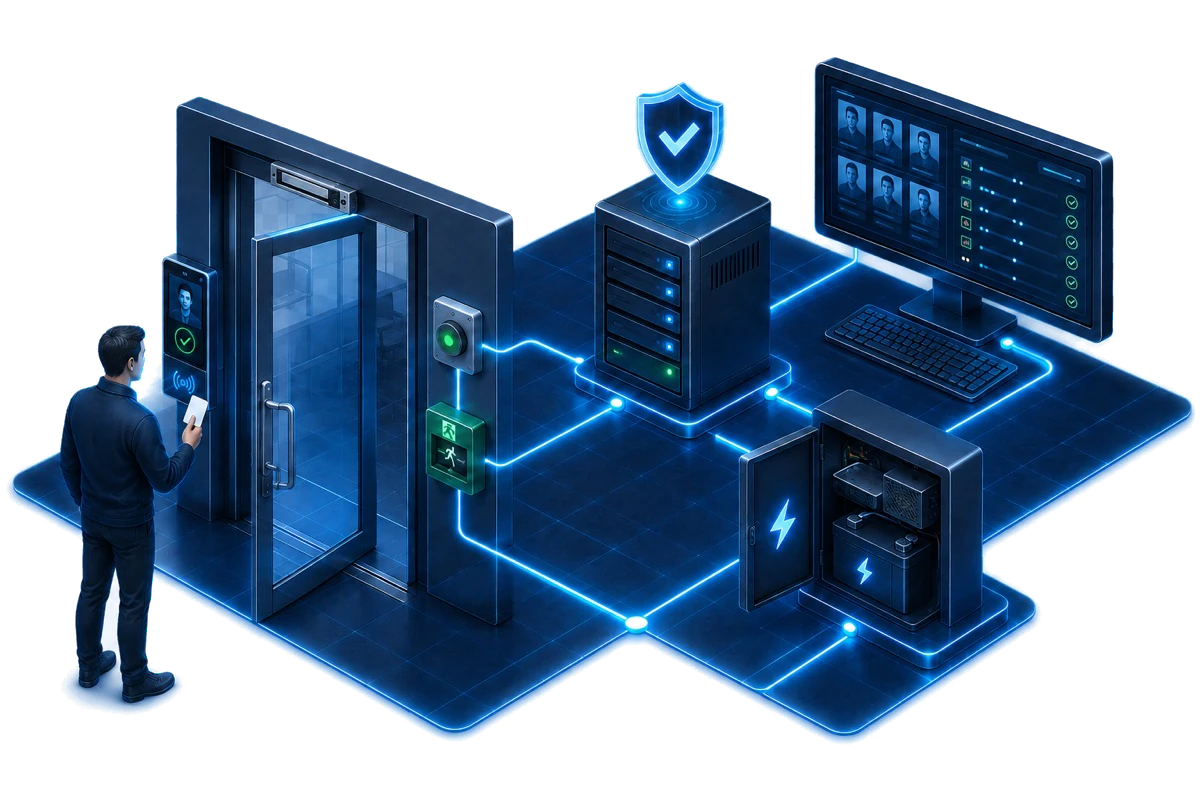
Conceptual illustration of an HJ access and identity solution linking a facial-recognition terminal, controlled door, emergency exit release, controller, management software and backup power.
Conceptual illustration of a coordinated HJ access and identity solution. Credentials, controller architecture, door hardware, emergency release, power backup, integrations and final scope depend on site assessment and the approved quotation.

Offline Standalone Access Terminal Package

Local control

The terminal stores authorised users and operates the lock directly without a separate external access controller or permanent network-management path.

Best for
One controlled door, a small user list and simple local administration where central reporting is not required.
Complete scope
Standalone terminal, selected credential method, lock and bracket, door contact, exit and emergency release, power backup, local enrolment, tests and handover.
Confirm before quotation
Offline management limits central revocation, reporting and integration. Standalone means no external controller; it does not describe every terminal as non-networked.

Connected All-in-One Access Terminal Package

Terminal controls door

The all-in-one terminal makes the access decision and controls the lock while using LAN, Wi-Fi, app or a supported platform for connected management.

Best for
Small and medium sites that want easier enrolment, records and remote administration without a separate controller panel at each door.
Complete scope
Connected terminal, selected credential method, network and account setup, lock and exit hardware, power backup, permissions, event records, tests and handover.
Confirm before quotation
Connected does not automatically mean cloud-managed or suitable for every integration. HJ confirms the exact protocol, platform, user capacity and offline behaviour.

Panel-Based Project Access Control Package

External controller

Readers or biometric devices send credentials to a protected external controller that manages one or many doors, rules and monitored events.

Best for
Factories, offices, institutions, commercial buildings and multi-door projects requiring central permissions and stronger controller architecture.
Complete scope
One-, two-, four- or multi-door controller design, readers, locks, monitored contacts, exit and emergency hardware, network, power backup, schedules, permission groups, event rules and commissioning.
Confirm before quotation
A facial or fingerprint device feeding an external controller is a biometric reader in this architecture—not automatically an all-in-one access terminal.

IP Video Intercom & Smart Entry Package

Call, verify, release

A SIP-capable door station lets a visitor call, speak and show video to an authorised indoor or software endpoint before the door is released.

Best for
Homes, apartments, offices, gates and reception points that need visitor calling and controlled entry in one workflow.
Complete scope
IP/SIP video door station, indoor monitor or supported answering endpoint, lock-release interface, network/PoE, call routing, user permissions, audio/video/door tests and handover.
Confirm before quotation
The outdoor device is a SIP video intercom, SIP door station or SIP door phone—not a SIP phone. Facial recognition is stated only when the selected door station actually supports it.
Fast Comparison

Compare the complete packages

Use this as a shortlist. HJ confirms quantities, exact products and system limits after site assessment.

Comparison table for Door Access & Identity System Packages
PackageBest forComplete system scopeConfirm first
Offline Standalone Access Terminal PackageOne controlled door, a small user list and simple local administration where central reporting is not required.Standalone terminal, selected credential method, lock and bracket, door contact, exit and emergency release, power backup, local enrolment, tests and handover.Offline management limits central revocation, reporting and integration. Standalone means no external controller; it does not describe every terminal as non-networked.
Connected All-in-One Access Terminal PackageSmall and medium sites that want easier enrolment, records and remote administration without a separate controller panel at each door.Connected terminal, selected credential method, network and account setup, lock and exit hardware, power backup, permissions, event records, tests and handover.Connected does not automatically mean cloud-managed or suitable for every integration. HJ confirms the exact protocol, platform, user capacity and offline behaviour.
Panel-Based Project Access Control PackageFactories, offices, institutions, commercial buildings and multi-door projects requiring central permissions and stronger controller architecture.One-, two-, four- or multi-door controller design, readers, locks, monitored contacts, exit and emergency hardware, network, power backup, schedules, permission groups, event rules and commissioning.A facial or fingerprint device feeding an external controller is a biometric reader in this architecture—not automatically an all-in-one access terminal.
IP Video Intercom & Smart Entry PackageHomes, apartments, offices, gates and reception points that need visitor calling and controlled entry in one workflow.IP/SIP video door station, indoor monitor or supported answering endpoint, lock-release interface, network/PoE, call routing, user permissions, audio/video/door tests and handover.The outdoor device is a SIP video intercom, SIP door station or SIP door phone—not a SIP phone. Facial recognition is stated only when the selected door station actually supports it.
Controlled-Entry Blueprint

How identity, access decisions and safe door release work together

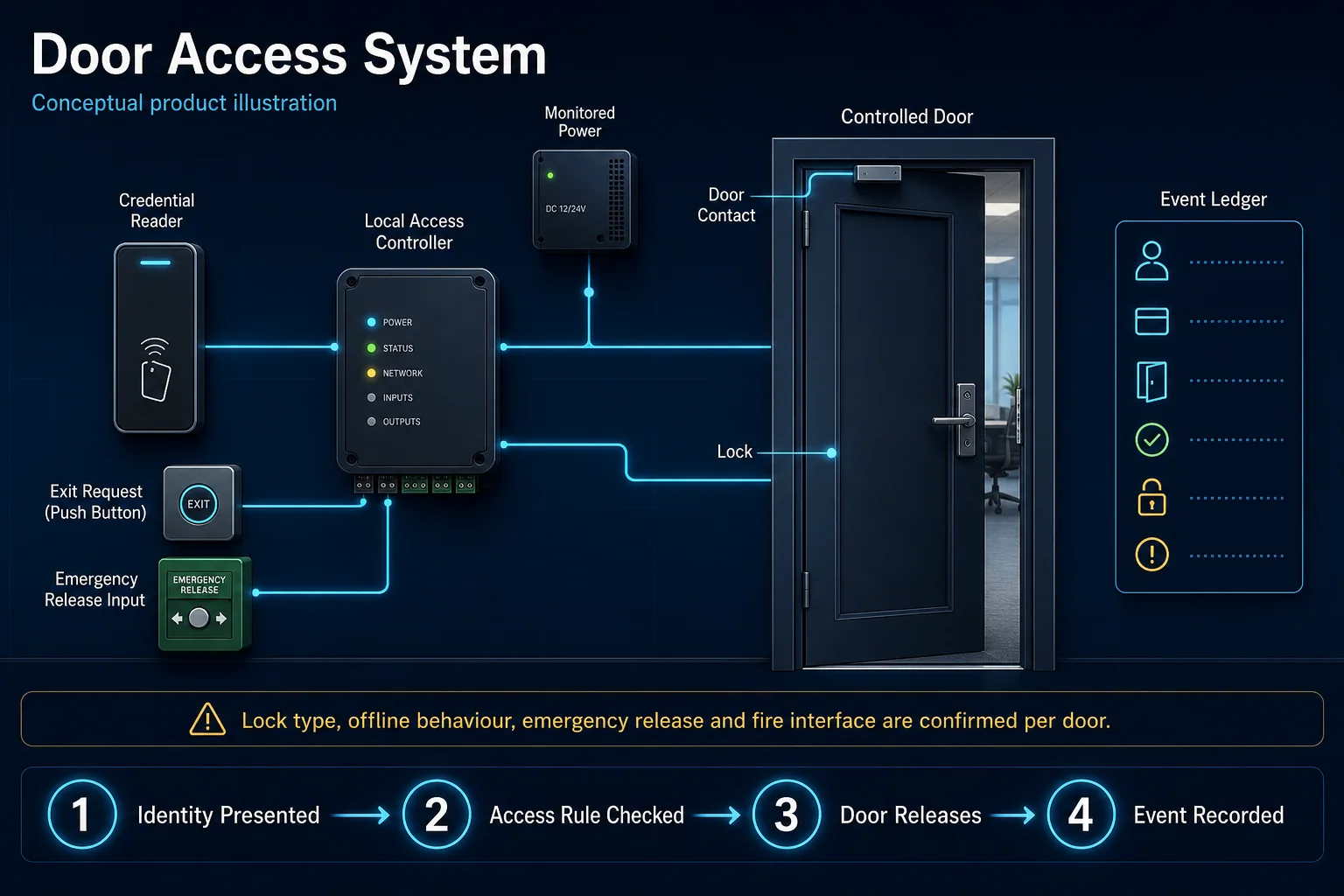
The control architecture is chosen before the credential. Standalone, connected all-in-one and panel-based access are alternatives; intercom and related-system integrations remain optional.

HJ access and identity blueprint connecting credentials, reader or terminal, access decision, locking hardware, safe exit, backup power and optional intercom or related-system integration.
System core / coordination layerAccess Decision Layer

Local terminal · all-in-one · protected controller

Main path coordinated in the system design Where specified only when confirmed in scope Central module control, management or coordination—not always one physical device

Select a numbered system below to open the matching solution explanation.

  1. 01Card, PIN, Fingerprint, Face, Mobile or QRSelected identity methodWhere specifiedSee this solution explanation →
  2. 02Reader or Access TerminalPresents the request to the decision layerSee this solution explanation →
  3. 03SIP Video Door Station & Answering EndpointVisitor calling and authorised remote releaseWhere specifiedSee this solution explanation →
  4. 04Lock, Bracket, Contact & Door CloserPhysical locking and door stateSee this solution explanation →
  5. 05Exit Device & Emergency ReleaseNormal egress and emergency release pathSee this solution explanation →
  6. 06Network, Power Supply & BackupApproved power and communication pathSee this solution explanation →
  7. 07Permissions, Schedules & Event RecordsManaged rules and audit historyWhere specifiedSee this solution explanation →
  8. 08Attendance, Visitor, Lift & Turnstile IntegrationApproved identity or permission workflowWhere specifiedSee this solution explanation →

Scope note: Conceptual architecture. Door count, material, lock type, life-safety interface, credential and management platform are confirmed per opening.

Diagram to Installation

Open the installation pages represented in this system diagram

Each page below highlights only the nodes it covers, explains its role in the complete Solution and returns to the exact numbered point in this diagram.

Highlighted diagram pathHikvision Access Terminal Hikvision Video Intercom Permissions & Records

Hikvision System Installation in Kuching, Sarawak

Hikvision access terminals and video intercom become part of the access-and-identity architecture only when those systems are selected.

Scope condition: Related only for a confirmed Hikvision door-access or video-intercom scope.

Highlighted diagram pathIdentity Linked to Door Access

Time Attendance System Installation in Kuching, Sarawak

The same identity may also support controlled doors when an approved access integration is included.

Scope condition: Related only when attendance identity is integrated with door access.

Package Level 02

Choose how each user proves identity

Credential methods can be used across several architectures and combined for multi-factor rules. The right choice depends on user volume, speed, visitor policy, enrolment and the consequence of a lost or shared credential.

Card, Keyfob & PIN Credentials

Familiar

Uses an issued physical credential, PIN or configured combination to request access.

Best for
Offices, stores, staff areas, apartments and controlled entrances with a managed issue/revocation process.
Complete scope
Compatible reader/terminal, cards or keyfobs where required, PIN policy, enrolment, permissions, event tests and user handover.
Confirm before quotation
Cards can be shared or lost and PINs can be observed. Revocation and user discipline are part of the operating process.

Fingerprint Authentication

Biometric

Uses an enrolled fingerprint as a personal credential, with a fallback where the selected system supports it.

Best for
Staff entrances and controlled internal doors where individual enrolment is practical.
Complete scope
Compatible fingerprint terminal or reader, user enrolment, permission rules, event tests and training.
Confirm before quotation
Finger condition, gloves, hygiene and enrolment quality affect daily use. A suitable fallback method should be agreed.

Facial Recognition Authentication

Touchless

Matches an enrolled face to authorised permissions for fast, touchless entry on a supported terminal or reader.

Best for
Higher-throughput staff entrances, offices and sites that want touchless verification.
Complete scope
Compatible facial terminal or reader, enrolment, permissions, liveness and event testing where supported, and handover.
Confirm before quotation
Face detection is not facial recognition. Lighting, mounting height, approach path, privacy governance and enrolment quality must be assessed.

Mobile, NFC, Bluetooth & QR Credentials

Digital

Issues a supported mobile or QR credential for employees or visitors instead of a permanent physical card.

Best for
Visitor access, temporary permissions and organisations that can manage digital credential issuance.
Complete scope
Compatible reader/terminal and platform, credential workflow, permissions, expiry/revocation rules, tests and training.
Confirm before quotation
Mobile, Bluetooth, NFC and dynamic QR support varies by platform and model. HJ confirms compatibility before committing the workflow.

Multi-Factor Authentication

Two proofs

Requires more than one compatible credential or rule before access is granted.

Best for
Sensitive rooms, restricted operations and doors with a higher consequence of unauthorised entry.
Complete scope
Compatible credential combination, controller or terminal rules, schedules, event handling, emergency procedure and commissioning.
Confirm before quotation
Additional verification increases control but may slow entry; emergency egress must remain safe and compliant.
Package Level 03

Door hardware, life safety and related systems

A credential can be accepted correctly while the physical door still fails. Every HJ package checks the lock, frame, closer, release, power and integration path.

Locking & Door Condition

Physical control

Magnetic lock, electric strike, drop bolt or other compatible hardware is selected around the actual door and use pattern.

Best for
Every controlled door.
Complete scope
Door/frame assessment, lock and bracket, door contact, closer coordination and mechanical alignment test.
Confirm before quotation
Glass, fire-rated, double-leaf and external doors require different hardware and approvals.

Exit, Emergency Release & Backup Power

Safe egress

Provides normal exit, authorised emergency release and an agreed behaviour during power failure.

Best for
Every controlled door.
Complete scope
Exit button/device, emergency break-glass where required, power supply/backup, fail-safe/fail-secure review and test record.
Confirm before quotation
Life-safety and building requirements take priority over access convenience. Final design must suit the authority and door use.
Verified Scope

Project proof without invented package claims

These cases verify door-access or related access-control scope. The public records do not identify whether face, fingerprint, card, mobile or multi-factor credentials were used, so HJ does not make that claim here.

Verified published scope

Sarawak General Hospital

Public scope confirms controlled entry and CCTV in a healthcare/public-sector environment.

View verified project scope →
Verified published scope

Fulton Park

Public scope confirms access control, lift access, intercom and other residential ELV systems.

View verified project scope →
Clear Responsibility

HJ delivers the system package; ISD maintains the product catalogue

The two routes work together without duplicating product ownership.

HJ complete installed package

  • Site assessment and functional design
  • System sizing and compatible equipment selection
  • Cabling, mounting, power and network coordination
  • Configuration, integration and commissioning
  • User handover, maintenance and support options

ISD models and supply

  • Individual model and SKU catalogue
  • Datasheets and product specifications
  • Availability, supply and product-only enquiries
  • Brand and component catalogue navigation
  • No duplicate claim that HJ is a retail catalogue
Clear Answers

Package selection questions

Use these answers to confirm the system boundary before model selection or quotation.

Does standalone door access mean it cannot connect to a network?

No. Standalone means the terminal can make the access decision and operate the door without a separate external controller. An offline standalone terminal is managed locally; a connected all-in-one terminal can still use LAN, Wi-Fi, app or a supported platform.

Is a facial recognition terminal the same as a facial recognition reader?

Not always. A terminal can make the access decision and control the lock itself. A biometric reader sends the credential to an external controller. HJ names the device according to the architecture actually installed.

What should the outdoor SIP device be called?

Use SIP video intercom, SIP door station or SIP door phone. SIP phone normally refers to an indoor answering endpoint, not the outdoor entrance device.

Which is better: card, fingerprint or face recognition?

There is no universal winner. Card access is familiar and easy to issue; fingerprint ties access to a person but depends on enrolment and finger condition; face recognition is touchless but depends on approach, lighting and privacy governance. HJ selects around the site workflow.

What is included in a complete door-access package?

The package can include the reader or terminal, controller, lock and brackets, door contact, exit and emergency release, power supply and backup, cabling, credential enrolment, permissions, event records, testing and training.

Can door access connect to attendance, visitor or lift control?

Yes when the selected platform and devices support the required integration. HJ defines the system boundary, permissions and test cases before installation.

Does HJ sell access terminals without installation?

HJ pages describe complete installed systems. Product-only model, datasheet, stock and supply enquiries are directed to the relevant ISD catalogue.

Terminology checked against Hikvision Access Control and HID IP-enabled standalone access example and 2N IP Intercom terminology. Exact current models, regional availability and supply remain subject to the ISD catalogue.