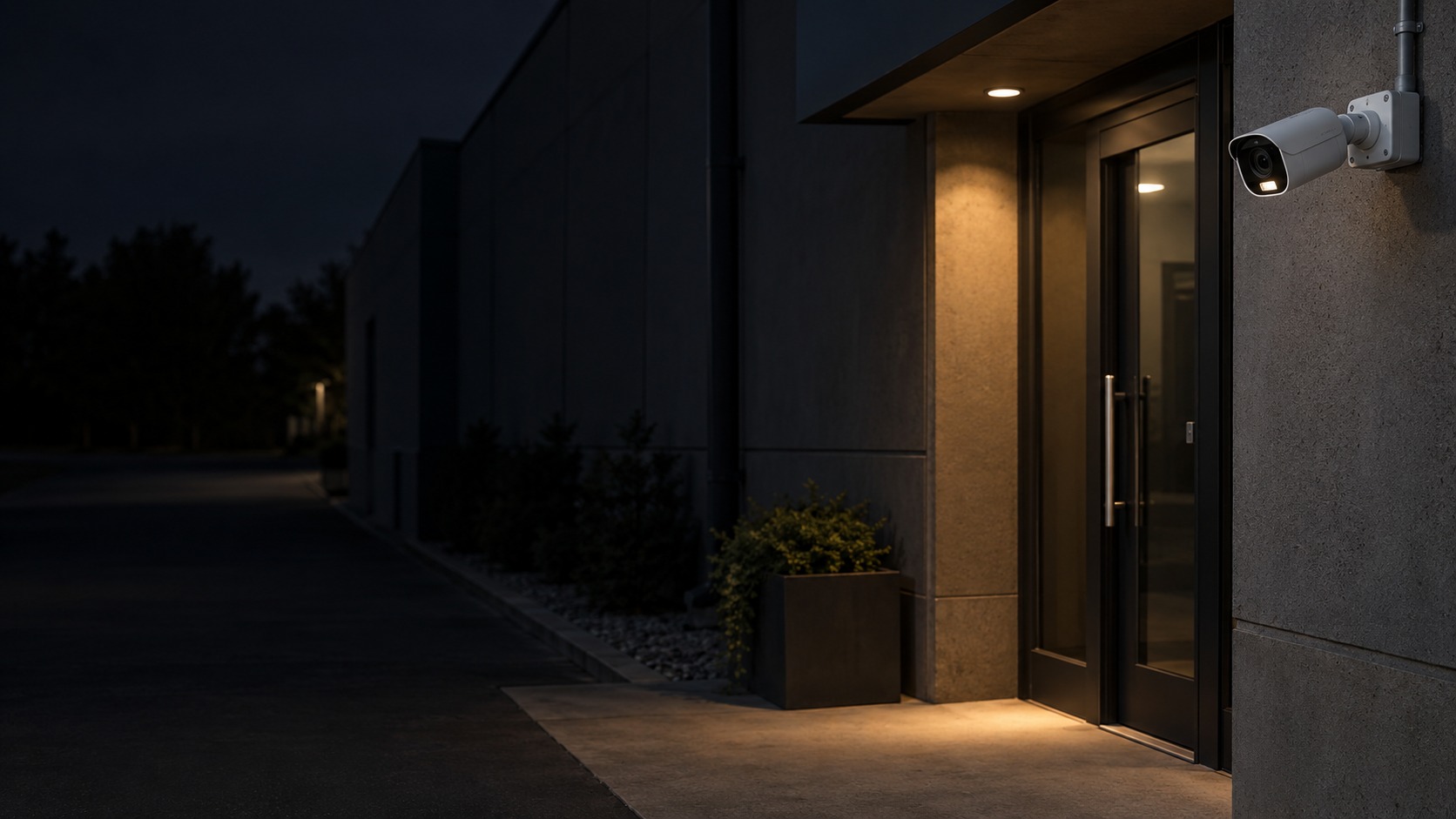
Camera and practical supplementary light at a night entrance (illustration)

ColorVu / Color Night Vision CCTV in Kuching & Sarawak

Capture useful colour detail at night with an appropriate camera, lens and lighting plan. HJ compares the real after-dark scene, moving subjects and permitted supplementary light; ColorVu and colour-night options are selected by model rather than treated as a guarantee of clear colour in every dark area.

System selection and integration guideCCTV / Video Surveillance
Special CCTVColorVu / Color Night Vision CCTV
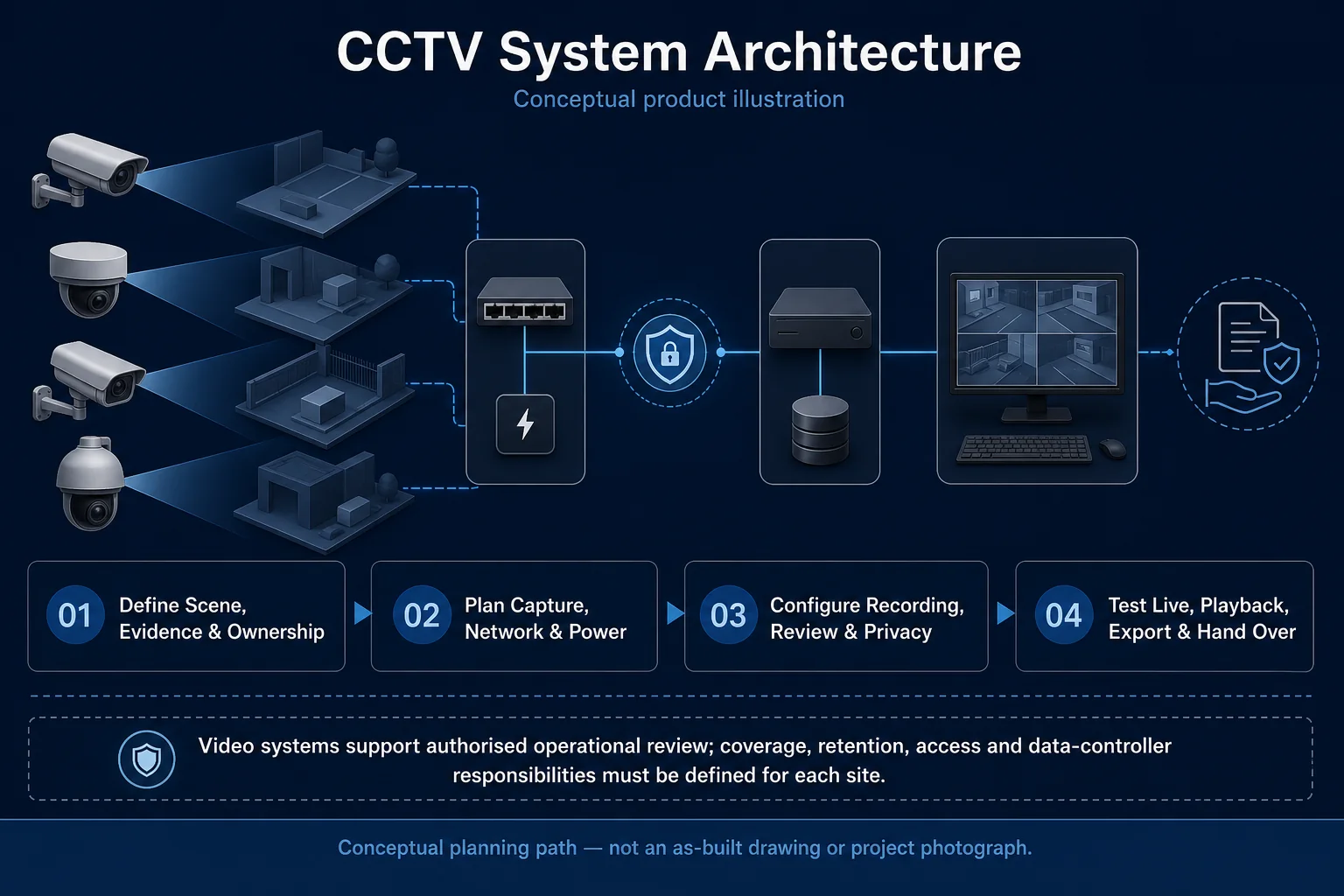
CCTV System Architecture system diagram
  1. 01ColorVu / Color Night Vision CCTV
  2. 02Coverage, lighting and response behaviour
  3. 03Transport & storage
  4. 04representative day and night clips
Conceptual ColorVu / Color Night Vision CCTV product and system illustration.
Illustration & scope boundary

Conceptual ColorVu / Color Night Vision CCTV product and system illustration for Special CCTV. Final device form, model, interfaces and quantities are confirmed from the assessed scope and approved product data. Conceptual evidence and response path for ColorVu / Color Night Vision CCTV, derived from this page's scope, interfaces and acceptance record.

Conceptual planning path — not an as-built drawing or project photograph.

System feature

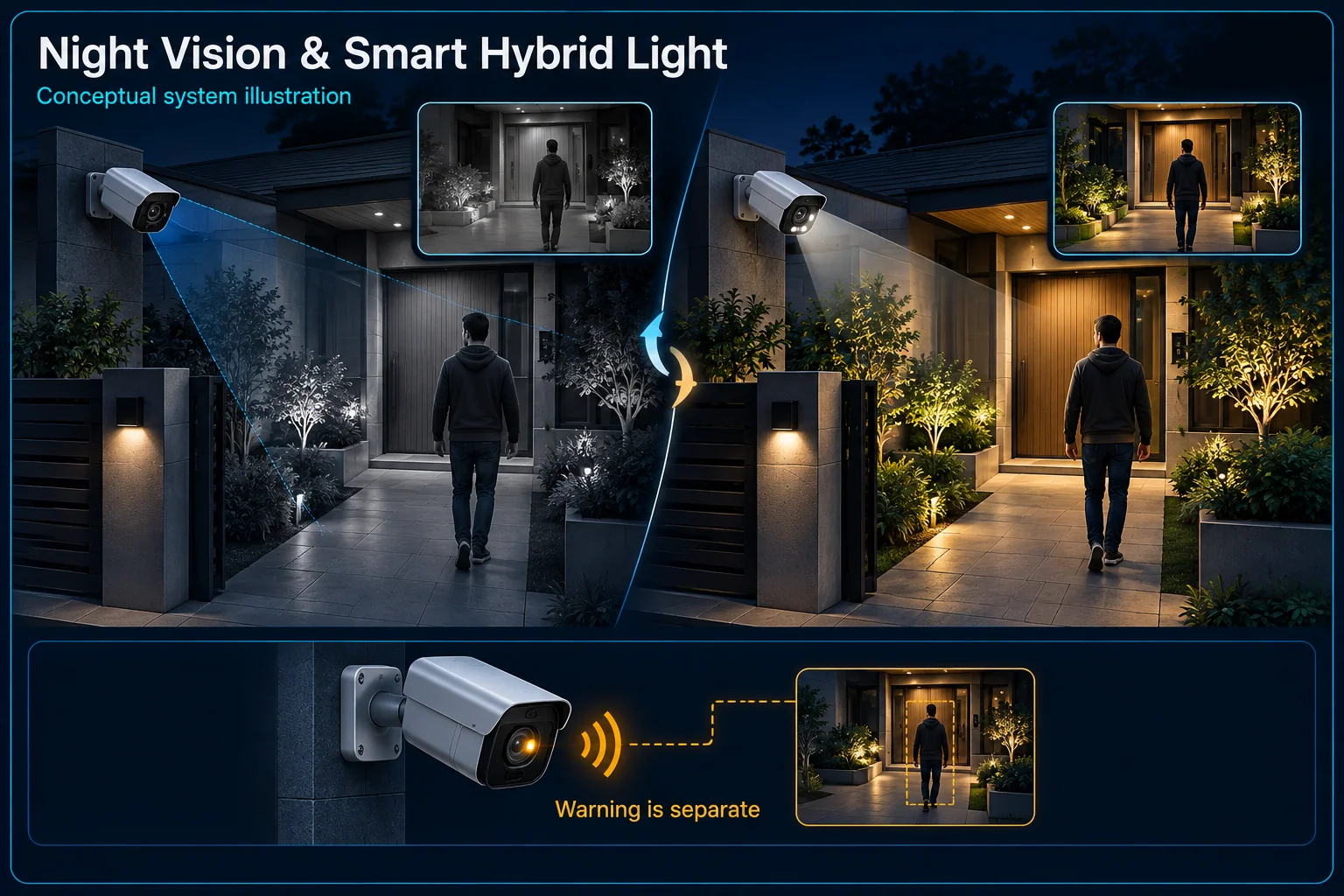
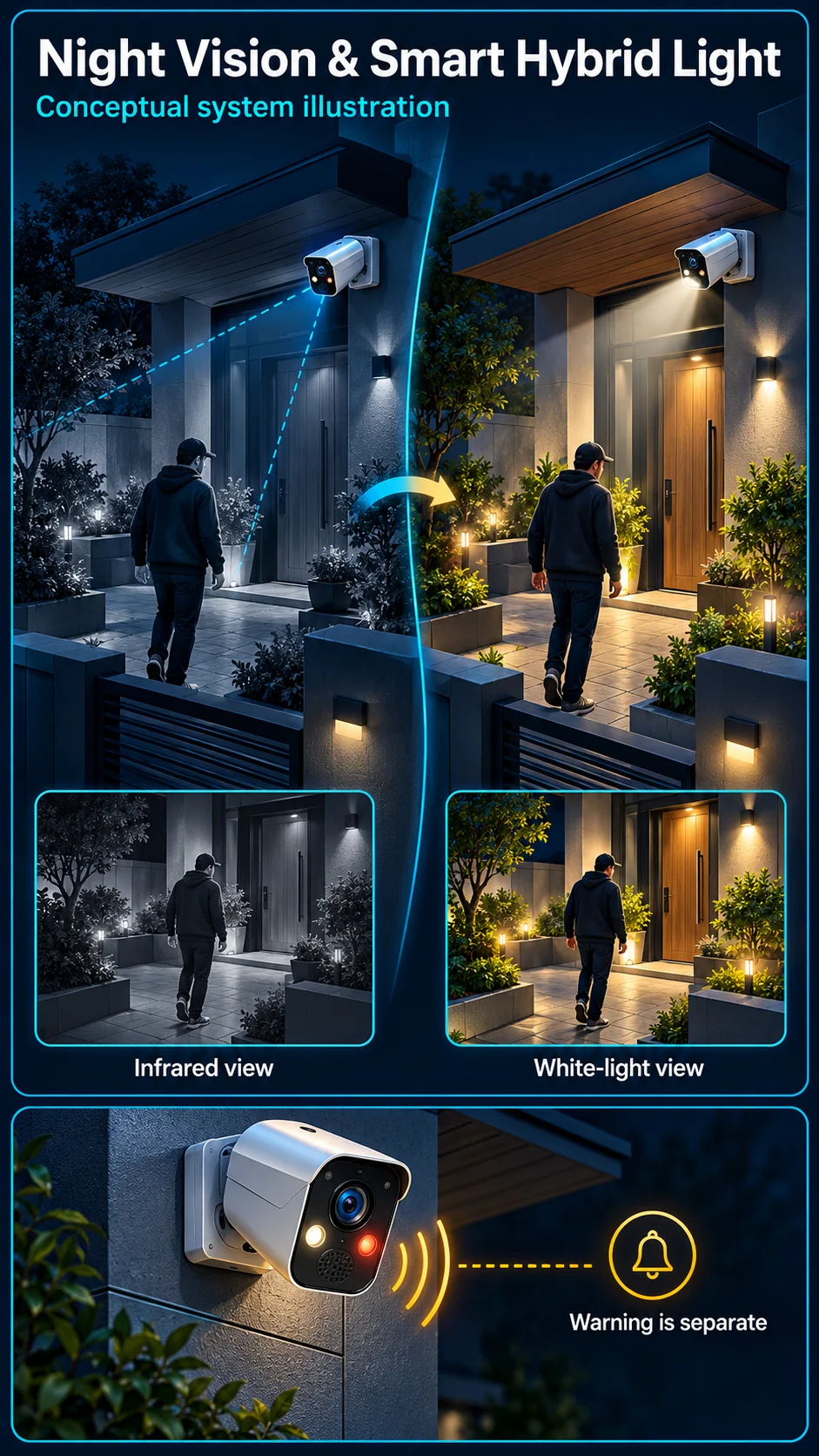
Night Vision, Colour & Smart Hybrid Light

Night visibility is a combination of the camera, available light, lens, mounting and recording settings. Compare infrared, white-light and supported automatic lighting modes against your scene. A useful night image and an active warning response are related choices, but not the same feature.

Night Vision & Smart Hybrid Light Canvas

ColorVu / Color Night Vision CCTV in Kuching & Sarawak – system diagram
Conceptual system illustration. Final configuration depends on the approved site scope.View full-size desktop imageView full-size mobile image
System planning notes

Lighting mode is not the warning output

Compare the purpose of each path. The illustration does not compare actual camera image quality.

Lighting mode is not the warning outputCompare the purpose of each path. The illustration does not compare actual camera image quality.E1E2E3E401Infrared mode02White-light mode03Supported lighting rule04Siren / warning light05Night playbackLighting mode is not the warning outputCompare the purpose of each path. The illustration does not compare actual camera image quality.E1E2E3E401Infrared mode02White-light mode03Supported lighting rule04Siren / warning light05Night playback
  • Solid line: illustrated functional path or agreed test route.
  • Dashed line: optional device or compatibility to confirm.
  • Illumination supports image capture; a warning output is a different function.
  • Dashed links require the exact device, configuration and accepted schedule.
Infrared mode

Image illumination; selected device

White-light mode

Visible illumination and scene impact

Supported lighting rule

Mode transition to verify

Siren / warning light

Separate optional capability

Night playback

Inspect the saved target view

Read the connections
  1. E1: Infrared mode → Night playbackRecorded view
  2. E2: White-light mode → Night playbackRecorded view
  3. E3: Supported lighting rule → White-light modeSupported mode change — optional / compatibility to confirm
  4. E4: Supported lighting rule → Siren / warning lightOnly if selected and supported — optional / compatibility to confirm
Conceptual system diagram. Final configuration depends on the approved site scope.

Understand the illumination choices

Infrared supports a different night-time view

An infrared mode can provide a monochrome view where the selected camera and scene allow it. Reflective surfaces, nearby walls, insects and obstructions can affect that view. Examine the actual route and target instead of treating a nominal illumination claim as the final image.

White light and colour need scene review

Colour may help describe clothing or an object when the camera receives suitable visible light. Review where supplemental light will fall and whether it affects neighbours, drivers or occupants. The selected model and lighting conditions determine the available modes.

Separate smart lighting from deterrence

Automatic illumination follows supported rules

Some cameras can change illumination mode around a supported target event. Confirm the exact mode, target settings and return behaviour. A change to white light does not by itself prove that a siren, warning strobe or alarm panel is included.

Warning flashes are a separate output

A warning light is intended to draw attention, while supplemental light helps capture the image. Document which device performs each job and when it may operate. Do not use the names ColorVu or Smart Hybrid Light as a substitute for checking warning hardware.

Plan for moving targets and changing lights

Static brightness is not the whole evidence task

A bright image of an empty yard may differ from a useful recording of someone walking through it. Review the intended motion, exposure choices and target positions. Demonstration footage from another installation cannot establish the result at your property.

Include headlights and nearby surfaces

Vehicle headlights, signs, reflective gates and close ceilings can change the scene at night. Record those conditions during planning and inspect how the installed view handles them. Adjust the position or lighting arrangement where the agreed task is not adequately supported.

Test lighting and response independently

Compare the agreed modes in recorded footage

Check the relevant night mode with the actual target route, then replay the saved clip. Note mode changes, image appearance, important detail and any distracting glare. This conceptual comparison illustrates operating choices, not a manufacturer image-quality benchmark.

Agree an occupant-friendly operating schedule

If automatic light or warnings are selected, demonstrate when they activate and stop. Review quiet hours, normal movement and manual control with the authorised user. Record the chosen schedule so future changes do not accidentally alter the accepted night-time behaviour.

Questions about Night Vision, Colour & Smart Hybrid Light

Does a camera with white light also have a siren?

Not necessarily. Supplemental illumination and audio warning are separate specifications. Check the complete selected model and the approved scope rather than assuming both are present.

Will every night recording stay in colour?

That depends on the camera, chosen mode and light reaching the scene. Agree the required evidence task and review actual recorded footage under the relevant night-time conditions.

Can the light stay off while the camera records?

The options depend on the selected camera and illumination mode. Confirm the permitted settings and test the resulting footage before accepting an operating arrangement.

Continue your planning

What ColorVu / Color Night Vision CCTV covers

Capture useful colour detail at night with an appropriate camera, lens and lighting plan. HJ compares the real after-dark scene, moving subjects and permitted supplementary light; ColorVu and colour-night options are selected by model rather than treated as a guarantee of clear colour in every dark area.

It sits in CCTV / Video Surveillance under Special CCTV. The final deliverable is shaped by the intended outcome, the installed or proposed environment and the interfaces that must be owned, supplied, integrated and tested.

When to use this page

After-dark scene photos, subject distance and movement, ambient light, reflection sources, neighbours’ lighting concerns and permitted white-light operating modes.
Typical environments to assess

  • Home gates with an agreed night-lighting policy
  • Shop entrances and sheltered after-hours approaches
  • Warehouse access points with an operator response plan

Engineering SOP & Handover Checklist

From the initial brief to the handover record: what to prepare, check and confirm with HJ.

01

Operational Purpose & Workflow

Capture useful colour detail at night with an appropriate camera, lens and lighting plan. HJ compares the real after-dark scene, moving subjects and permitted supplementary light; ColorVu and colour-night options are selected by model rather than treated as a guarantee of clear colour in every dark area.

02

Pre-Attendance Evidence

After-dark scene photos, subject distance and movement, ambient light, reflection sources, neighbours’ lighting concerns and permitted white-light operating modes.
03

Diagnostic & Testing Path

Coordinate night exposure and permitted lighting with recording and any separately supported warning or audio functions. Keep illumination, automatic deterrence and live talk-back distinct in the approved scope.

04

System & Responsibility Boundary

A bright static scene can hide moving-subject blur or glare. Test the actual night scene and supported functions, considering light spill, neighbouring properties and permitted audio recording or warnings.

05

Acceptance & Handover Record

Keep agreed light or audio settings, night test conditions, representative moving-subject footage, event rules and the operator handover. Record where useful detail or a selected function was not achieved.

Engineering Scope, Regulatory & Service Boundaries

Responsibility and evidence boundary

HJ coordinates assessment, engineering, installation, integration, testing and lifecycle support only for the scope recorded in the quotation. ISD handles catalogue, model, datasheet, supply and availability enquiries. Customer, consultant, builder and appointed-specialist responsibilities remain explicit.

Identity, image, credential and movement data require an authorised controller, lawful access, proportionate collection, retention rules and recorded administrator responsibility.

This focused topic remains connected to its complete system owner. Final models, quantities, interfaces and included work are confirmed in the assessed quotation.

Questions before proceeding

Use the answers as a planning boundary; site conditions and written scope remain decisive.

Does colour night vision mean no light is ever needed?

No. Useful colour depends on available light and the selected camera. Supported supplementary lighting may be needed in very dark scenes. A real night test should check moving subjects, glare and the viewing distance, not only a bright static image.

How should night performance be checked?

Use the real after-dark conditions and representative movement at the required distance. Review recorded footage as well as live view, including reflections, glare, light spill and any permitted supplementary lighting.

What should I send HJ for ColorVu / Color Night Vision CCTV?

After-dark scene photos, subject distance and movement, ambient light, reflection sources, neighbours’ lighting concerns and permitted white-light operating modes. Share authorised equipment and scene information; do not send passwords or personal footage through a public form.
Planning ColorVu / Color Night Vision CCTV? Tell HJ about your site

Tell us where it will be used, what it needs to do and what equipment you already have. HJ will recommend the right system, explain who is responsible for what, and agree the next step with you.