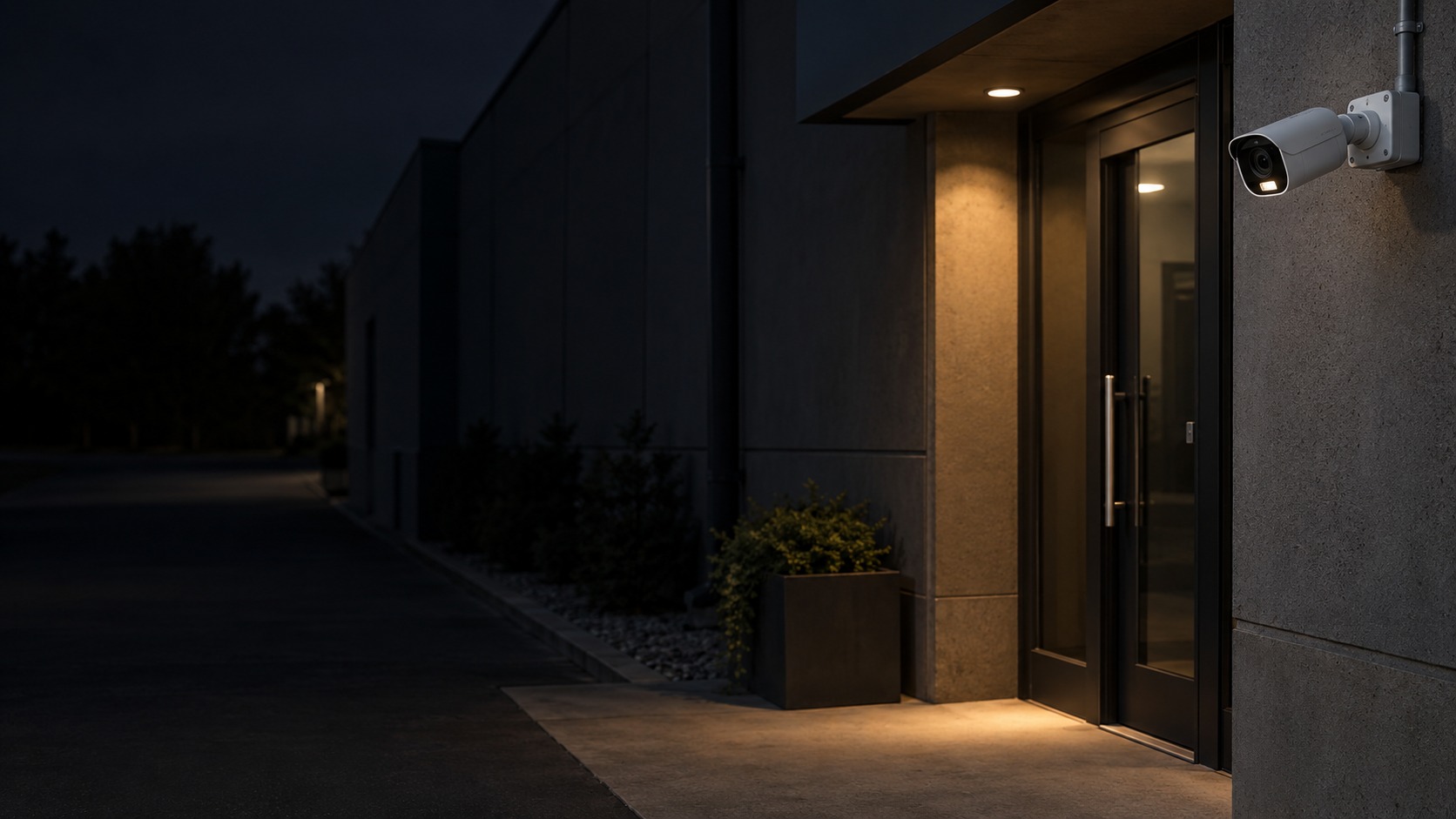
Camera and practical supplementary light at a night entrance (illustration)

Hikvision Two-Way Audio CCTV in Kuching & Sarawak

Provide authorised live talk-back at selected Hikvision camera points where microphone, speaker and platform support are available. HJ checks speech intelligibility, permissions and recording policy; two-way audio is not automatically an alarm siren, intercom call workflow or emergency communication system.

System selection and integration guideCCTV / Video Surveillance
Hikvision Feature PagesHikvision Two-Way Audio CCTV
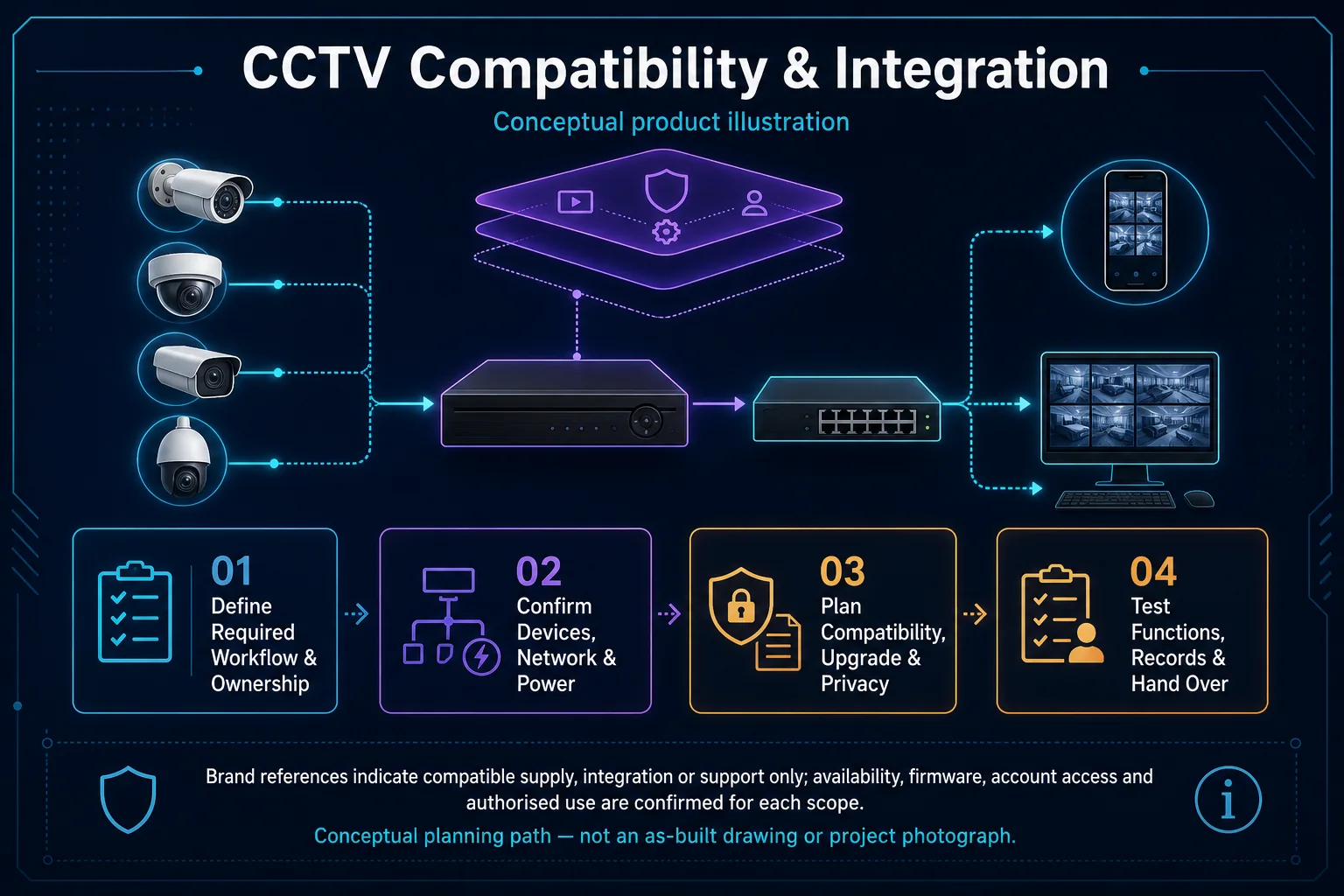
CCTV Compatibility and Integration system diagram
  1. 01Hikvision Two-Way Audio CCTV
  2. 02Coverage, lighting and response behaviour
  3. 03Transport & storage
  4. 04representative day and night clips
Conceptual Hikvision Two-Way Audio CCTV product and system illustration.
Illustration & scope boundary

Conceptual Hikvision Two-Way Audio CCTV product and system illustration for Hikvision Feature Pages. Final device form, model, interfaces and quantities are confirmed from the assessed scope and approved product data. Conceptual evidence and response path for Hikvision Two-Way Audio CCTV, derived from this page's scope, interfaces and acceptance record.

Conceptual planning path — not an as-built drawing or project photograph.

System feature

CCTV Microphone & Two-Way Audio

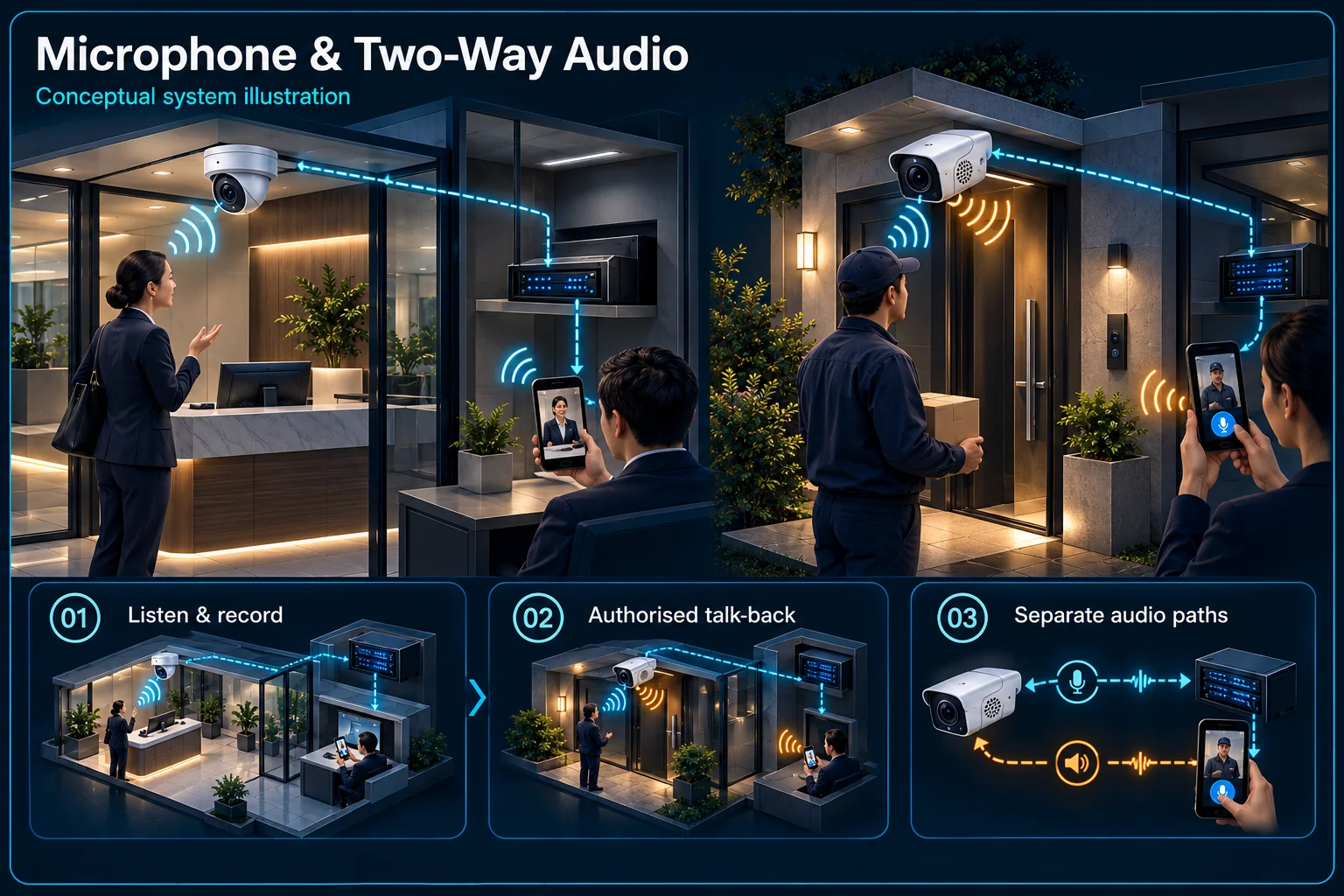
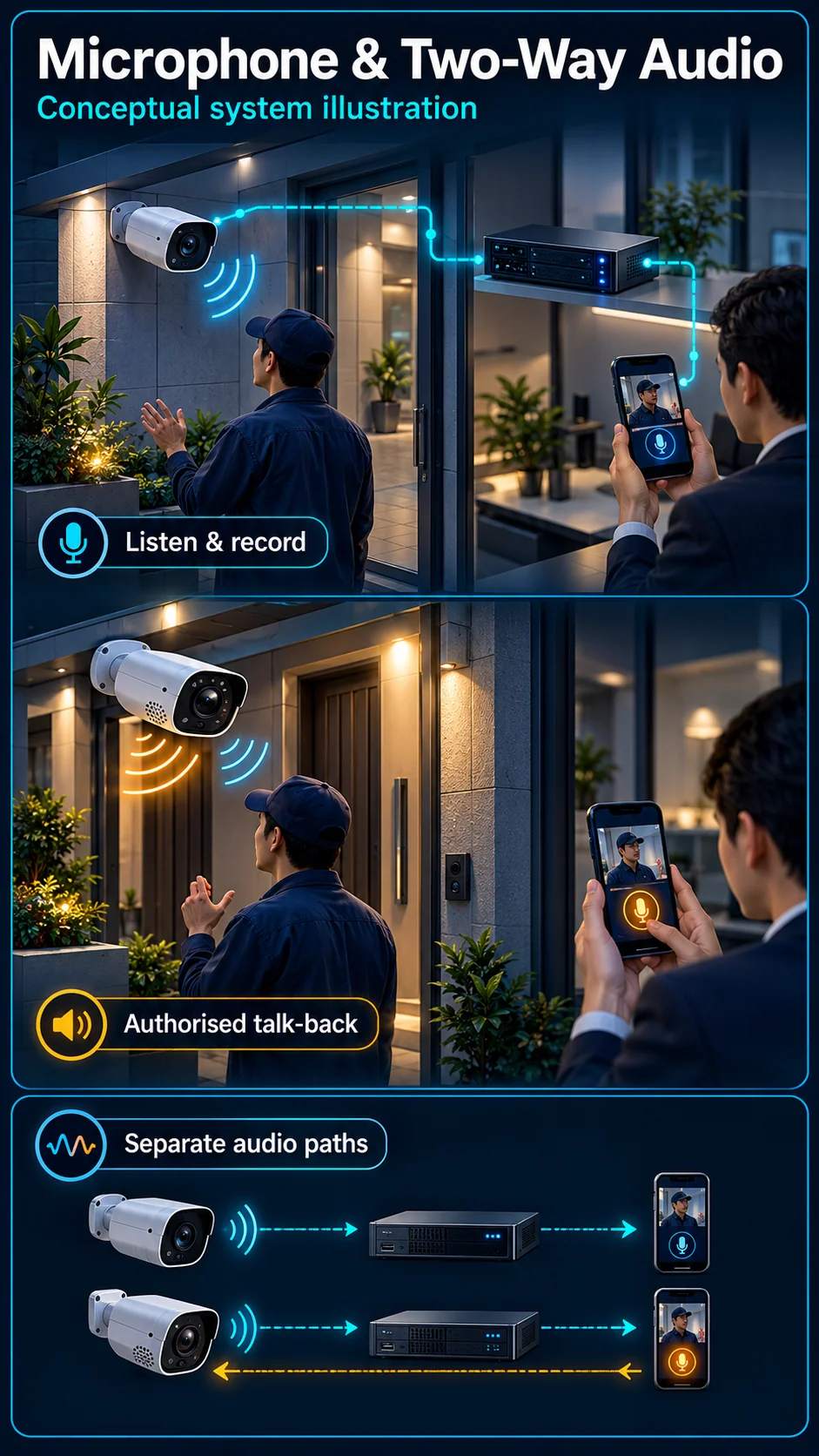
Hearing a camera, speaking through it and triggering an automatic warning are three separate audio workflows. HJ identifies the microphone, speaker, supported communication path and user permissions before describing an installation as two-way audio or active deterrence.

Microphone & Two-Way Audio Canvas

Hikvision Two-Way Audio CCTV in Kuching & Sarawak – system diagram
Conceptual system illustration. Final configuration depends on the approved site scope.View full-size desktop imageView full-size mobile image
System planning notes

Three different audio workflows

A shared camera body does not make listening, speaking and automatic warning the same function.

Three different audio workflowsA shared camera body does not make listening, speaking and automatic warning the same function.E1E2E3E401Microphone02Listen / recording03Authorised user04Supported speaker05Configured eventThree different audio workflowsA shared camera body does not make listening, speaking and automatic warning the same function.E1E2E3E401Microphone02Listen / recording03Authorised user04Supported speaker05Configured event
  • Solid line: illustrated functional path or agreed test route.
  • Dashed line: optional device or compatibility to confirm.
  • A microphone does not prove a speaker or talk-back function.
  • Automatic warning requires a supported event, output and schedule.
Microphone

Sound capture where supported

Listen / recording

Authorised audio use

Authorised user

Manual conversation

Supported speaker

Return talk path

Configured event

Separate automatic warning rule

Read the connections
  1. E1: Microphone → Listen / recordingOne-way listening
  2. E2: Authorised user → Supported speakerManual talk-back
  3. E3: Microphone → Authorised userListening where supported
  4. E4: Configured event → Supported speakerOptional automatic warning — optional / compatibility to confirm
Conceptual system diagram. Final configuration depends on the approved site scope.

Know which audio path is included

A microphone captures sound

A supported microphone can provide listening or sound recording through an appropriate system. It does not establish a speaker at the camera. Check whether sound is available live, in saved clips or both, and agree where audio collection is appropriate.

Two-way talk needs a return path

Speaking from an authorised phone or operator position needs a compatible talk path and speaker as well as the listening path. Review the selected camera, recorder and app arrangement together. A microphone-only model needs a confirmed speaker and return path to provide two-way talk.

Separate conversation from automatic warning

Live talk is an operator action

A user chooses when to speak and what to say. Establish who can access that control, the intended use and the effect on people nearby. A live conversation should not be described as an automatically triggered alarm response.

An automatic message follows configured conditions

A compatible camera may support an automatic warning after a qualifying event. Check the supported sound, trigger and schedule separately from live talk. White illumination, a warning strobe and an independent siren remain other functions, even where one camera combines several of them.

Choose audio for the actual operating environment

Noise and mounting affect useful communication

Road traffic, machinery, wind and the distance to the intended speaker can affect intelligibility. Review the actual mounting position and expected conversation location. Do not promise an arbitrary listening or speaking distance without evidence for the selected equipment and conditions.

Permissions and privacy belong in the plan

Agree which authorised users may listen, replay sound or speak. Consider where recording is appropriate and how occupants are informed under the site's policies. Store access should match the purpose of the system rather than simply enabling audio everywhere.

Test each approved audio function

Listen live and replay the saved clip

Use speech from the agreed location in representative background noise. Verify whether audio is present in the recording and follows the expected channel and timestamp. This is different from checking that the app displays a microphone icon.

Demonstrate talk and warning independently

For a selected two-way device, demonstrate speaking from the authorised user account. If automatic audio warning is also selected, trigger it under the agreed rule and verify its stopping behaviour. Record the accepted volume, permissions and schedule without activating unnecessary noise during demonstrations.

Questions about CCTV Microphone & Two-Way Audio

Does Interactive Pro include remote talk-back?

The approved Interactive Pro reference describes microphone listening, not a universal speaker or talk-back path. Two-way audio requires a specifically supported selection and system arrangement.

Does the app's talk button prove the camera has a speaker?

No. Available controls alone do not establish the complete working path. Verify the selected device, permissions and actual two-way demonstration.

Can I record video without recording sound?

Review the available settings and the site's audio policy for the selected system. Confirm the accepted live and recorded audio behaviour during handover rather than assuming both must operate together.

Continue your planning

What Hikvision Two-Way Audio CCTV covers

Provide authorised live talk-back at selected Hikvision camera points where microphone, speaker and platform support are available. HJ checks speech intelligibility, permissions and recording policy; two-way audio is not automatically an alarm siren, intercom call workflow or emergency communication system.

It sits in CCTV / Video Surveillance under Hikvision Feature Pages. The final deliverable is shaped by the intended outcome, the installed or proposed environment and the interfaces that must be owned, supplied, integrated and tested.

When to use this page

Talk-back locations, background noise, operator device and app, microphone and speaker capability, user permissions and whether recorded audio is authorised.

Typical environments to assess

  • Home gates with an agreed night-lighting policy
  • Shop entrances and sheltered after-hours approaches
  • Warehouse access points with an operator response plan

Engineering SOP & Handover Checklist

From the initial brief to the handover record: what to prepare, check and confirm with HJ.

01

Operational Purpose & Workflow

Provide authorised live talk-back at selected Hikvision camera points where microphone, speaker and platform support are available. HJ checks speech intelligibility, permissions and recording policy; two-way audio is not automatically an alarm siren, intercom call workflow or emergency communication system.

02

Pre-Attendance Evidence

Talk-back locations, background noise, operator device and app, microphone and speaker capability, user permissions and whether recorded audio is authorised.

03

Diagnostic & Testing Path

Coordinate night exposure and permitted lighting with recording and any separately supported warning or audio functions. Keep illumination, automatic deterrence and live talk-back distinct in the approved scope.

04

System & Responsibility Boundary

A live image can work while talk-back fails because of permissions, device support or network delay. Audio coverage and recording consent must be checked independently from image quality.

05

Acceptance & Handover Record

Test authorised talk-back from the intended operator device, speech in the actual noise conditions, access restrictions and agreed audio recording settings; record any delay or unsupported function.

Engineering Scope, Regulatory & Service Boundaries

Responsibility and evidence boundary

HJ coordinates assessment, engineering, installation, integration, testing and lifecycle support only for the scope recorded in the quotation. ISD handles catalogue, model, datasheet, supply and availability enquiries. Customer, consultant, builder and appointed-specialist responsibilities remain explicit.

Brand names identify compatibility or installed-platform enquiries only. They do not claim authorised distributor, service-centre, partner, warranty or parts status.

Identity, image, credential and movement data require an authorised controller, lawful access, proportionate collection, retention rules and recorded administrator responsibility.

This focused topic remains connected to its complete system owner. Final models, quantities, interfaces and included work are confirmed in the assessed quotation.
Questions before proceeding

Use the answers as a planning boundary; site conditions and written scope remain decisive.

Does a built-in microphone provide two-way audio?

Not by itself. A microphone captures sound; talk-back also needs a supported speaker and communication path. Check the exact model, platform, network and operator permissions, and agree whether audio is recorded.

How should night performance be checked?

Use the real after-dark conditions and representative movement at the required distance. Review recorded footage as well as live view, including reflections, glare, light spill and any permitted supplementary lighting.

What should I send HJ for Hikvision Two-Way Audio CCTV?

Talk-back locations, background noise, operator device and app, microphone and speaker capability, user permissions and whether recorded audio is authorised. Share authorised equipment and scene information; do not send passwords or personal footage through a public form.

Planning Hikvision Two-Way Audio CCTV? Tell HJ about your site

Tell us where it will be used, what it needs to do and what equipment you already have. HJ will recommend the right system, explain who is responsible for what, and agree the next step with you.