Face / Fingerprint / RFID Access Service in Kuching
Diagnose enrolment, matching or credential-read problems on the installed face, fingerprint or RFID equipment. HJ distinguishes a failed credential from denied permissions or a door fault, uses authorised access and verifies the agreed alternative credential after correction.
Installed system + service modeFace / Fingerprint / RFID Access Service in Kuching
01Face / Fingerprint / RFID Access Service in Kuching
02Maintenance / Service
03Credential, door hardware and safe release
04grant, deny and schedule transactions
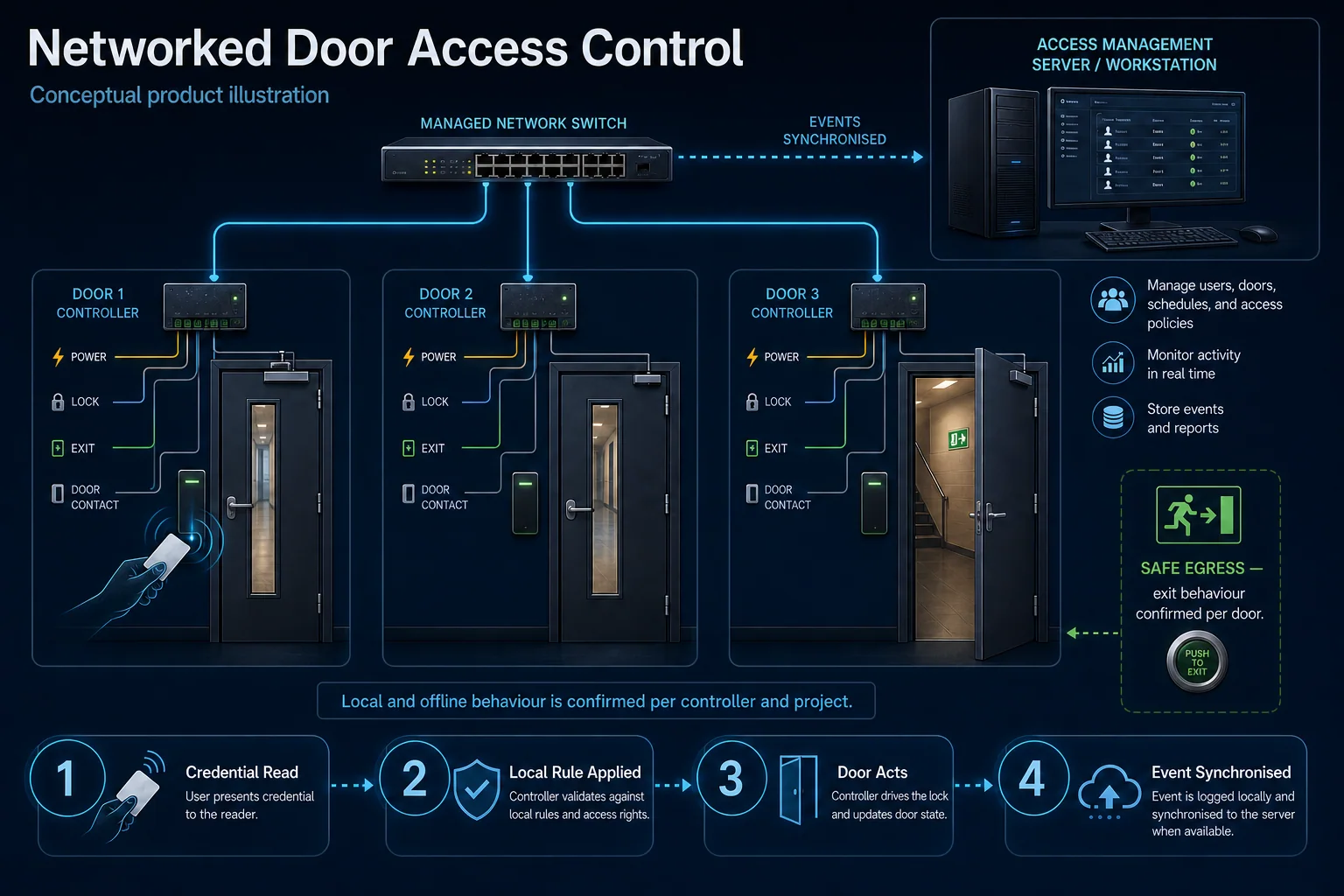
Conceptual Face / Fingerprint / RFID Access Service system illustration. Face / Fingerprint / RFID Access Service in Kuching combines the installed-system path with the stated service mode; diagnosis and corrective scope remain subject to inspection and approval. Conceptual identity and permission path for Face / Fingerprint / RFID Access Service in Kuching, derived from this page's scope, interfaces and acceptance record.
Conceptual planning path — not an as-built drawing or project photograph.
Before booking a service visit
Tell us the fault and your location. Diagnostic attendance, repairs, parts and any travel charges are confirmed with you before work.
What Face / Fingerprint / RFID Access Service in Kuching covers
Diagnose enrolment, matching or credential-read problems on the installed face, fingerprint or RFID equipment. HJ distinguishes a failed credential from denied permissions or a door fault, uses authorised access and verifies the agreed alternative credential after correction.
It sits in Door Access Service under Access Control. The final deliverable is shaped by the intended outcome, the installed or proposed environment and the interfaces that must be owned, supplied, integrated and tested.
When to use this page
Device/reader models, affected credential type, authorised test users, enrolment history, permission settings, biometric-data responsibility and alternative entry method.
Typical environments to assess
Staff doors with suitable enrolled-finger conditions.
Sites retaining an alternative credential for failed matching.
From the initial brief to the handover record: what to prepare, check and confirm with HJ.
01
Operational Purpose & Workflow
Diagnose enrolment, matching or credential-read problems on the installed face, fingerprint or RFID equipment. HJ distinguishes a failed credential from denied permissions or a door fault, uses authorised access and verifies the agreed alternative credential after correction.
02
Pre-Attendance Evidence
Device/reader models, affected credential type, authorised test users, enrolment history, permission settings, biometric-data responsibility and alternative entry method.
03
Diagnostic & Testing Path
Confirm the reader or terminal decision path, controller protocol, lock output, door contact, exit devices, power and supported software. Attendance, intercom or alarm links require a documented interface and responsible owner; a working credential does not prove the complete door is safe.
04
System & Responsibility Boundary
Test valid and denied entry, ordinary exit and the approved emergency release with responsible parties. Network loss, power loss and backup affect different components; document the actual installed behaviour without assuming fail-safe means every escape requirement is satisfied.
05
Acceptance & Handover Record
Record opening IDs, device/firmware labels, credentials and user groups, permitted schedules, administrative ownership, power/release dependencies, acceptance results and unresolved limits. Keep personal data, retention, revocation and later changes under the owner policy.
Engineering Scope, Regulatory & Service Boundaries
Responsibility and evidence boundary
HJ coordinates assessment, engineering, installation, integration, testing and lifecycle support only for the scope recorded in the quotation. ISD handles catalogue, model, datasheet, supply and availability enquiries. Customer, consultant, builder and appointed-specialist responsibilities remain explicit.
Identity, image, credential and movement data require an authorised controller, lawful access, proportionate collection, retention rules and recorded administrator responsibility.
Installed platform, authorised ownership, parts compatibility and serviceability are checked before any repair or restoration outcome is proposed.
Related Systems, Installation & Support
See related systems, how HJ installs them, and support for equipment you already have.
Use the answers as a planning boundary; site conditions and written scope remain decisive.
Why can a recognised credential still be denied?
Reading or matching a credential is separate from granting permission to that door at that time. Review authorised user rules, expiry and the controller/lock path. Do not change permissions or enrolment without the responsible administrator.
Which interfaces need confirmation for this scope?
Confirm the reader or terminal decision path, controller protocol, lock output, door contact, exit devices, power and supported software. Attendance, intercom or alarm links require a documented interface and responsible owner; a working credential does not prove the complete door is safe.
What should be verified and recorded at handover?
Test valid and denied entry, ordinary exit and the approved emergency release with responsible parties. Network loss, power loss and backup affect different components; document the actual installed behaviour without assuming fail-safe means every escape requirement is satisfied. Record opening IDs, device/firmware labels, credentials and user groups, permitted schedules, administrative ownership, power/release dependencies, acceptance results and unresolved limits. Keep personal data, retention, revocation and later changes under the owner policy.
Need Face / Fingerprint / RFID Access Service? Tell HJ about your system
Tell us what the system is, what is going wrong or what you want checked. HJ will confirm the work needed, explain who is responsible for what, and agree the next step with you before any work starts.