Building facilities workstation and enclosed plant controls (illustration)

BMS / KNX / Fire Alarm Interface in Kuching & Sarawak

Assess documented interfaces between BMS, KNX and the fire-alarm system under the appointed fire-system and building-control parties. HJ separates permitted status monitoring from any approved command, records the interface and test matrix, and retains independent life-safety operation; integration is never permission to bypass or reset protection.

System selection and integration guideIntegration Platform
IntegrationBMS / KNX / Fire Alarm Interface
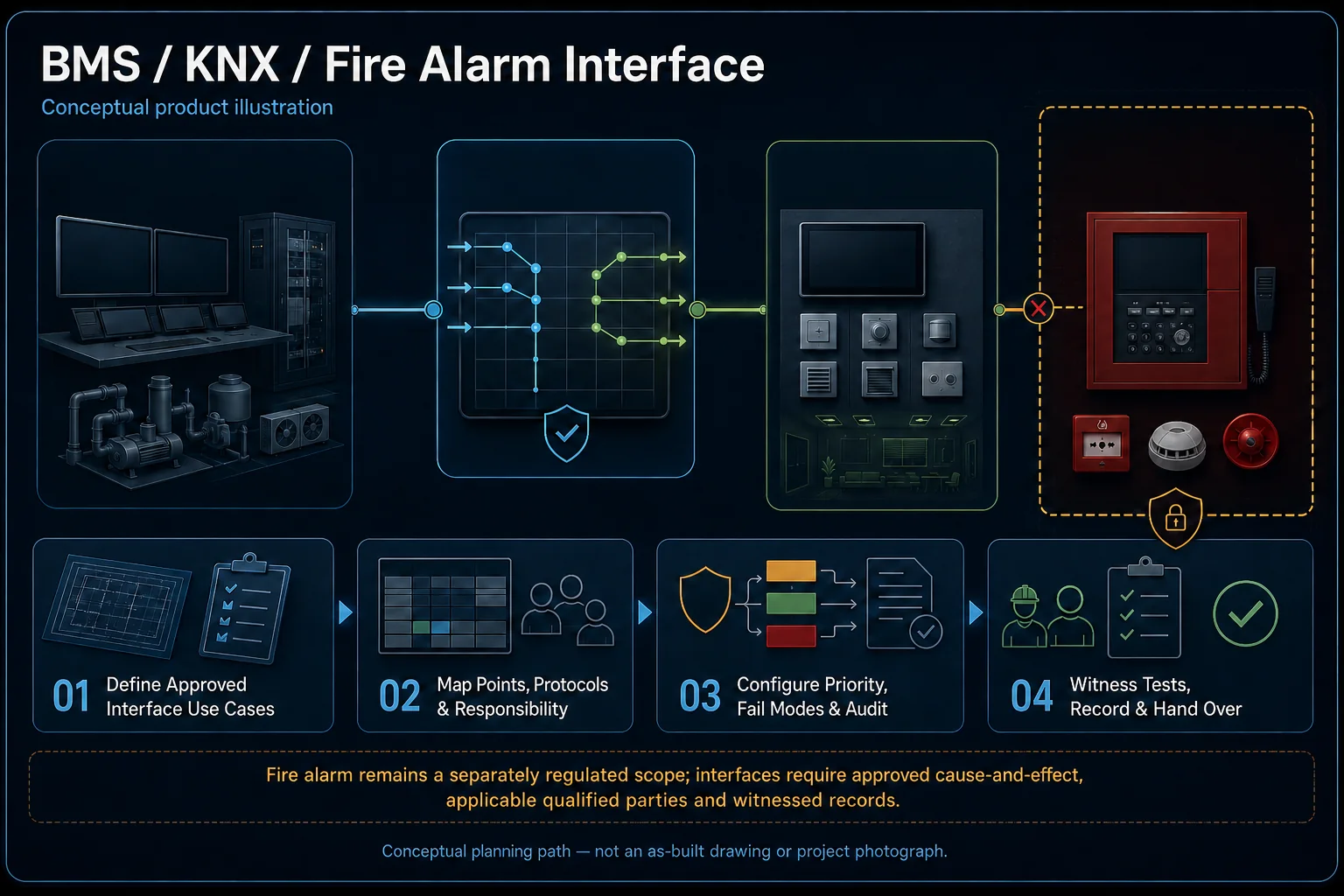
BMS, KNX and Fire Alarm Interface system diagram
  1. 01BMS / KNX / Fire Alarm Interface
  2. 02Points, protocols and control responsibility
  3. 03Field interface
  4. 04normal data or event exchange
Conceptual BMS / KNX / Fire Alarm Interface product and system illustration.
Illustration & scope boundary

Conceptual BMS / KNX / Fire Alarm Interface product and system illustration for Integration. Final device form, model, interfaces and quantities are confirmed from the assessed scope and approved product data. Conceptual sense, decide and control loop for BMS / KNX / Fire Alarm Interface, derived from this page's scope, interfaces and acceptance record.

Conceptual planning path — not an as-built drawing or project photograph.

What BMS / KNX / Fire Alarm Interface covers

Assess documented interfaces between BMS, KNX and the fire-alarm system under the appointed fire-system and building-control parties. HJ separates permitted status monitoring from any approved command, records the interface and test matrix, and retains independent life-safety operation; integration is never permission to bypass or reset protection.

It sits in Integration Platform under Integration. The final deliverable is shaped by the intended outcome, the installed or proposed environment and the interfaces that must be owned, supplied, integrated and tested.

When to use this page

Exact panel/gateway/protocol versions, approved status/command list, cause-and-effect ownership, read/write permissions, fire-party approval, independent protection and witnessed tests.

Typical environments to assess

  • Buildings with documented plant points and specialist owners.
  • Read-only monitoring or approved commands with named permissions.
  • Supported multi-system interfaces with independent protection retained.

Engineering SOP & Handover Checklist

From the initial brief to the handover record: what to prepare, check and confirm with HJ.

01

Operational Purpose & Workflow

Assess documented interfaces between BMS, KNX and the fire-alarm system under the appointed fire-system and building-control parties. HJ separates permitted status monitoring from any approved command, records the interface and test matrix, and retains independent life-safety operation; integration is never permission to bypass or reset protection.

02

Pre-Attendance Evidence

Exact panel/gateway/protocol versions, approved status/command list, cause-and-effect ownership, read/write permissions, fire-party approval, independent protection and witnessed tests.

03

Diagnostic & Testing Path

Create an owned point/interface matrix with supported protocols, units, scaling, read/write permissions and responsible plant parties. Supervisory commands must respect approved plant sequences, priorities and independent protection.

04

System & Responsibility Boundary

Verify agreed points against real plant or sensor conditions, then test permitted commands, alarms, trends and outage recovery with the responsible parties. A graphic or changing number alone is not evidence of correct control or current data.

05

Acceptance & Handover Record

Retain point/interface and network schedules, configuration ownership, witnessed scaling/sequence results, alarm and trend checks, access permissions, supported backup and operator handover. Record unavailable points, exclusions and recovery limits.

Engineering Scope, Regulatory & Service Boundaries

Responsibility and evidence boundary

HJ coordinates assessment, engineering, installation, integration, testing and lifecycle support only for the scope recorded in the quotation. ISD handles catalogue, model, datasheet, supply and availability enquiries. Customer, consultant, builder and appointed-specialist responsibilities remain explicit.

Regulated or multi-discipline work proceeds only after site assessment and confirmation of the competent, qualified or appointed persons, approvals, safe isolation and responsibility required for that scope.

This focused topic remains connected to its complete system owner. Final models, quantities, interfaces and included work are confirmed in the assessed quotation.

Questions before proceeding

Use the answers as a planning boundary; site conditions and written scope remain decisive.

May a BMS or home scene freely reset or override a fire alarm?

No. Any interface and permitted action require the responsible fire-system party and applicable approvals. Define monitoring and authorised control separately, preserve independent life-safety functions and perform the approved witnessed tests; never treat a dashboard as a replacement fire panel.

Which connected functions and responsibilities need confirmation?

Create an owned point/interface matrix with supported protocols, units, scaling, read/write permissions and responsible plant parties. Supervisory commands must respect approved plant sequences, priorities and independent protection.

What should be tested and recorded before handover?

Verify agreed points against real plant or sensor conditions, then test permitted commands, alarms, trends and outage recovery with the responsible parties. A graphic or changing number alone is not evidence of correct control or current data. Retain point/interface and network schedules, configuration ownership, witnessed scaling/sequence results, alarm and trend checks, access permissions, supported backup and operator handover. Record unavailable points, exclusions and recovery limits.

Planning BMS / KNX / Fire Alarm Interface? Tell HJ about your site

Tell us where it will be used, what it needs to do and what equipment you already have. HJ will recommend the right system, explain who is responsible for what, and agree the next step with you.