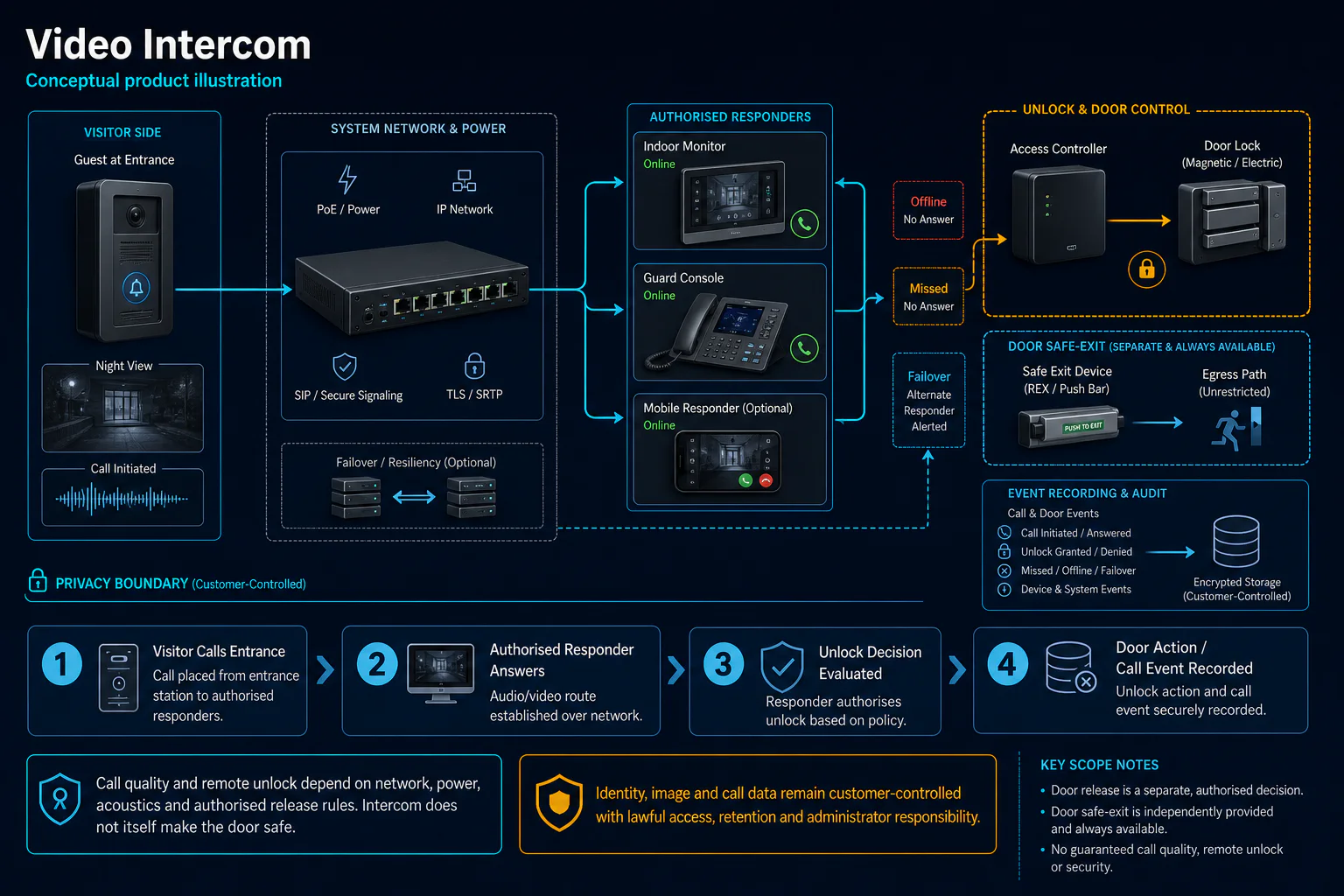
Check calling, video, audio, power and authorised door release as one visitor-entry workflow. HJ confirms the installed station family and compatibility before recommending repair or replacement.
Installed-system service canvasVideo Intercom Service & Maintenance
Conceptual Video Intercom Service & Maintenance installed-system context — diagnosis, corrective scope and verification follow inspection and approval.
Installed-system diagnosticVideo Intercom Service & Maintenance
Conceptual Video Intercom Service & Maintenance service path: record the installed state, diagnose the system, approve corrective work and verify the result.
Service lifecycle
01Annual Maintenance02Preventive Maintenance03Repair04Troubleshooting05Replacement06Upgrade07Testing08Configuration09Emergency Service
Before booking a service visit
Tell us the fault and your location. Diagnostic attendance, repairs, parts and any travel charges are confirmed with you before work.
HJ separates diagnosis from the final repair or upgrade so the customer can approve the documented action.
Record the symptom
Tell HJ the system, location, fault, recent changes and operational impact.
Confirm ownership & boundary
We identify administrator access, warranty, third parties, regulated scope and customer responsibilities.
Inspect & diagnose
A technician checks the agreed system path and records findings before replacement or reconfiguration.
Approve the action
Repair, replacement, configuration, testing or upgrade proceeds only against the confirmed scope and quotation.
Verify & document
HJ tests the agreed outcome, records remaining limitations and recommends the next maintenance action.
Visible Service Scope
Video Intercom Service & Maintenance
Use this list to identify the closest symptom or planned task. It is not a promise that a specific repair, spare part or platform access is available before inspection.
01Planned maintenance & inspection
Video Intercom Maintenance
Condominium Intercom Maintenance
02Troubleshooting, testing & health checks
Intercom Troubleshooting
Intercom Network Troubleshooting
Intercom Door Unlock Troubleshooting
03Repair & replacement
Video Intercom Repair
Indoor Station Replacement
Outdoor Station Replacement
Intercom Power Supply Repair
04System-specific service
Hikvision Video Intercom Service
Brand wording: Hikvision names identify possible installed systems for compatibility-led assessment. They do not state that HJ is an authorised or certified service centre. Model support, parts, credentials and warranty status must be checked.
Combine this system into an Annual Maintenance Contract
HJ can assess a single system or coordinate several installed systems under one documented AMC. Scope, frequency, response, parts and exclusions are confirmed after the asset baseline.
Engineering Scope, Regulatory & Service Boundaries
System ownership and serviceability boundary
Station compatibility depends on generation, protocol, firmware, licences, wiring and account ownership. Door release and emergency egress are confirmed separately from the calling function.
General boundary: an assessment does not guarantee spare-part availability, data recovery, uninterrupted service or compatibility with unsupported equipment. Work proceeds against the confirmed quotation and customer authorisation.
Cross-Page Journey
From installed system to relevant proof
Use the related package, industry and project routes to understand what the service supports without confusing product supply, installation and maintenance roles.
Request an assessment for Video Intercom Service & Maintenance
Send the site location, system type, fault symptom, equipment photo and operational impact. HJ will confirm the appropriate assessment route before work is scheduled.