Office access point, laptop and mesh node – Office / Business / Factory Wi-Fi in Kuching & Sarawak (illustration)

Office / Business / Factory Wi-Fi in Kuching & Sarawak

Design wireless coverage and capacity for work areas, mobile devices and business applications. Mounting, backhaul, power, client density and staff or guest separation are agreed before representative site tests.

System selection and integration guideWi-Fi
Wi-Fi SolutionsOffice / Business / Factory Wi-Fi
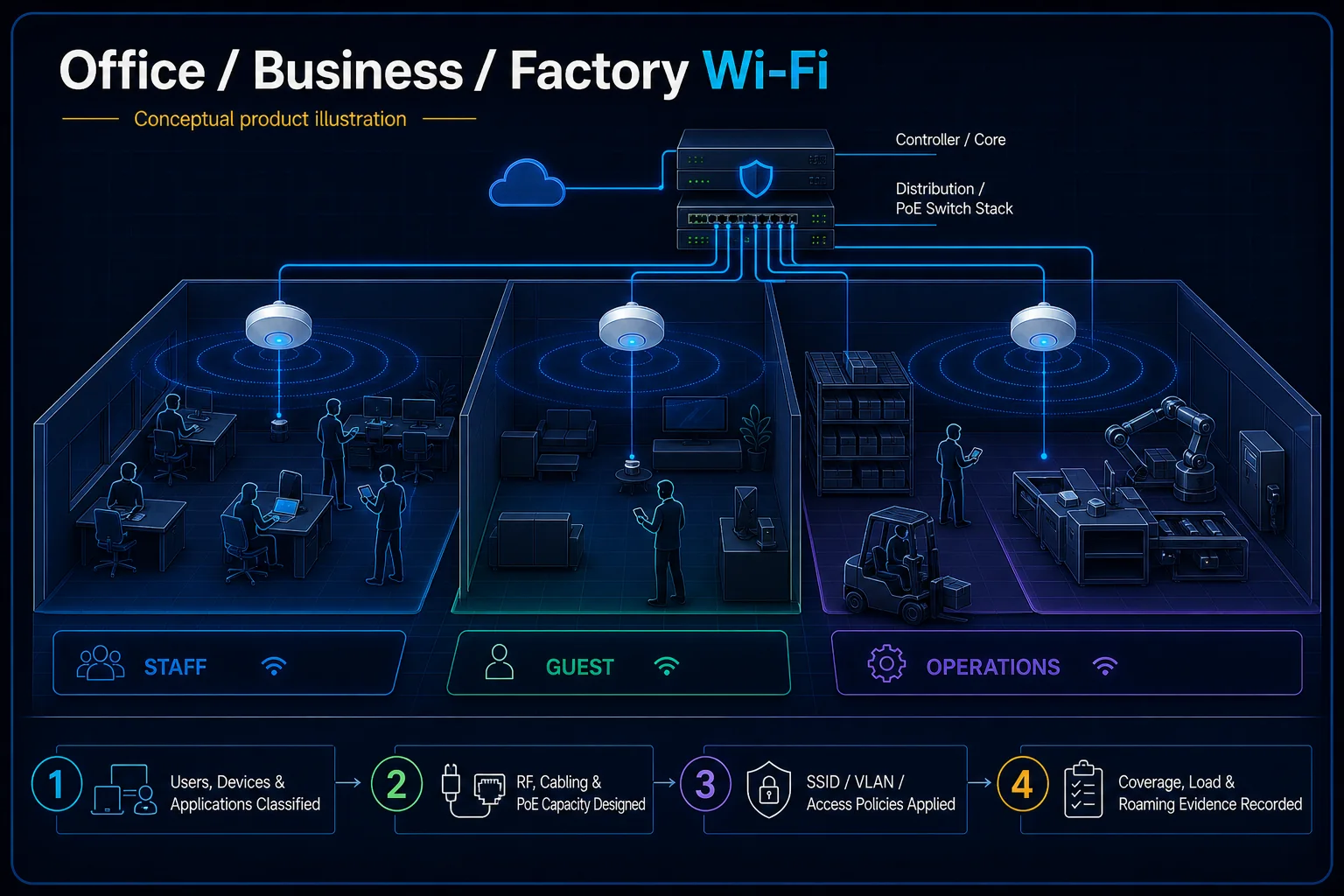
Office, Business and Factory Wi-Fi system diagram
  1. 01Office / Business / Factory Wi-Fi
  2. 02Coverage, capacity and roaming
  3. 03Distribution edge
  4. 04coverage-walk samples
Conceptual Office / Business / Factory Wi-Fi product and system illustration.
Illustration & scope boundary

Conceptual Office / Business / Factory Wi-Fi product and system illustration for Wi-Fi Solutions. Final device form, model, interfaces and quantities are confirmed from the assessed scope and approved product data. Conceptual transport and endpoint path for Office / Business / Factory Wi-Fi, derived from this page's scope, interfaces and acceptance record.

Conceptual planning path — not an as-built drawing or project photograph.

What Office / Business / Factory Wi-Fi covers

Design wireless coverage and capacity for work areas, mobile devices and business applications. Mounting, backhaul, power, client density and staff or guest separation are agreed before representative site tests.

It sits in Wi-Fi under Wi-Fi Solutions. The final deliverable is shaped by the intended outcome, the installed or proposed environment and the interfaces that must be owned, supplied, integrated and tested.

When to use this page

Design wireless coverage and capacity for work areas, mobile devices and business applications. Mounting, backhaul, power, client density and staff or guest separation are agreed before representative site tests. Map work areas, mobile-device use and shift density; check ceiling or wall mounting, interference sources, network uplinks, PoE needs, VLANs and critical applications.

Typical environments to assess

  • Homes and multi-floor premises
  • Office and factory work areas
  • Guest areas in hotels, schools or restaurants
  • Agreed outdoor areas with suitable equipment

Engineering SOP & Handover Checklist

From the initial brief to the handover record: what to prepare, check and confirm with HJ.

01

Operational Purpose & Workflow

Define Wi-Fi Solutions as the operating result for Office / Business / Factory Wi-Fi, including the users, process and exceptions it must serve.

Design wireless coverage and capacity for work areas, mobile devices and business applications. Mounting, backhaul, power, client density and staff or guest separation are agreed before representative site tests.

02

Pre-Attendance Evidence

For Office / Business / Factory Wi-Fi, confirm scaled floor plan and materials, concurrent users, devices and applications, RF, uplink, VLAN, guest and controller ownership.

Map work areas, mobile-device use and shift density; check ceiling or wall mounting, interference sources, network uplinks, PoE needs, VLANs and critical applications.

03

Diagnostic & Testing Path

Map Source & uplink → Core transport → Distribution edge → Managed endpoint for Office / Business / Factory Wi-Fi and identify every interface owned by HJ, the customer, ISD supply or an appointed specialist.

04

System & Responsibility Boundary

Wi-Fi speed is bounded by RF conditions, client capability, contention, backhaul and ISP service; signal bars alone are not acceptance. Final models, capacities and quantities still follow survey, compatibility and availability.

Coverage depends on the building, interference, clients and backhaul. A stronger local signal does not fix an ISP fault or guarantee the speed of every device.

05

Acceptance & Handover Record

For Office / Business / Factory Wi-Fi, record coverage-walk samples, throughput at agreed locations, roaming, segmentation and controller record; also agree link, throughput or power test, addressing and segmentation record, label, route and handover schedule before handover.

Check agreed locations with representative devices and record signal, connection and application behaviour under stated conditions. Hand over access settings and remaining limitations.

Engineering Scope, Regulatory & Service Boundaries

Responsibility and evidence boundary

HJ coordinates assessment, engineering, installation, integration, testing and lifecycle support only for the scope recorded in the quotation. ISD handles catalogue, model, datasheet, supply and availability enquiries. Customer, consultant, builder and appointed-specialist responsibilities remain explicit.

Final scope, quantities, compatibility, access, programme, availability and responsibility are confirmed during assessment and quotation.

This focused topic remains connected to its complete system owner. Final models, quantities, interfaces and included work are confirmed in the assessed quotation.

Questions before proceeding

Use the answers as a planning boundary; site conditions and written scope remain decisive.

What should be confirmed for Office / Business / Factory Wi-Fi?

Map work areas, mobile-device use and shift density; check ceiling or wall mounting, interference sources, network uplinks, PoE needs, VLANs and critical applications.

What are the limits of this scope?

Coverage depends on the building, interference, clients and backhaul. A stronger local signal does not fix an ISP fault or guarantee the speed of every device.

What should be checked before handover?

Check agreed locations with representative devices and record signal, connection and application behaviour under stated conditions. Hand over access settings and remaining limitations.

Planning Office / Business / Factory Wi-Fi? Tell HJ about your site

Tell us where it will be used, what it needs to do and what equipment you already have. HJ will recommend the right system, explain who is responsible for what, and agree the next step with you.