
BMS Troubleshooting in Kuching

Controller, sensor, dashboard, protocol, integration and upgrade support. This page focuses on Building Automation within BMS Service, with site inputs, interfaces, verification and responsibility kept visible.

Installed-system service taskBMS Service
Installed system + service modeBMS Troubleshooting in Kuching
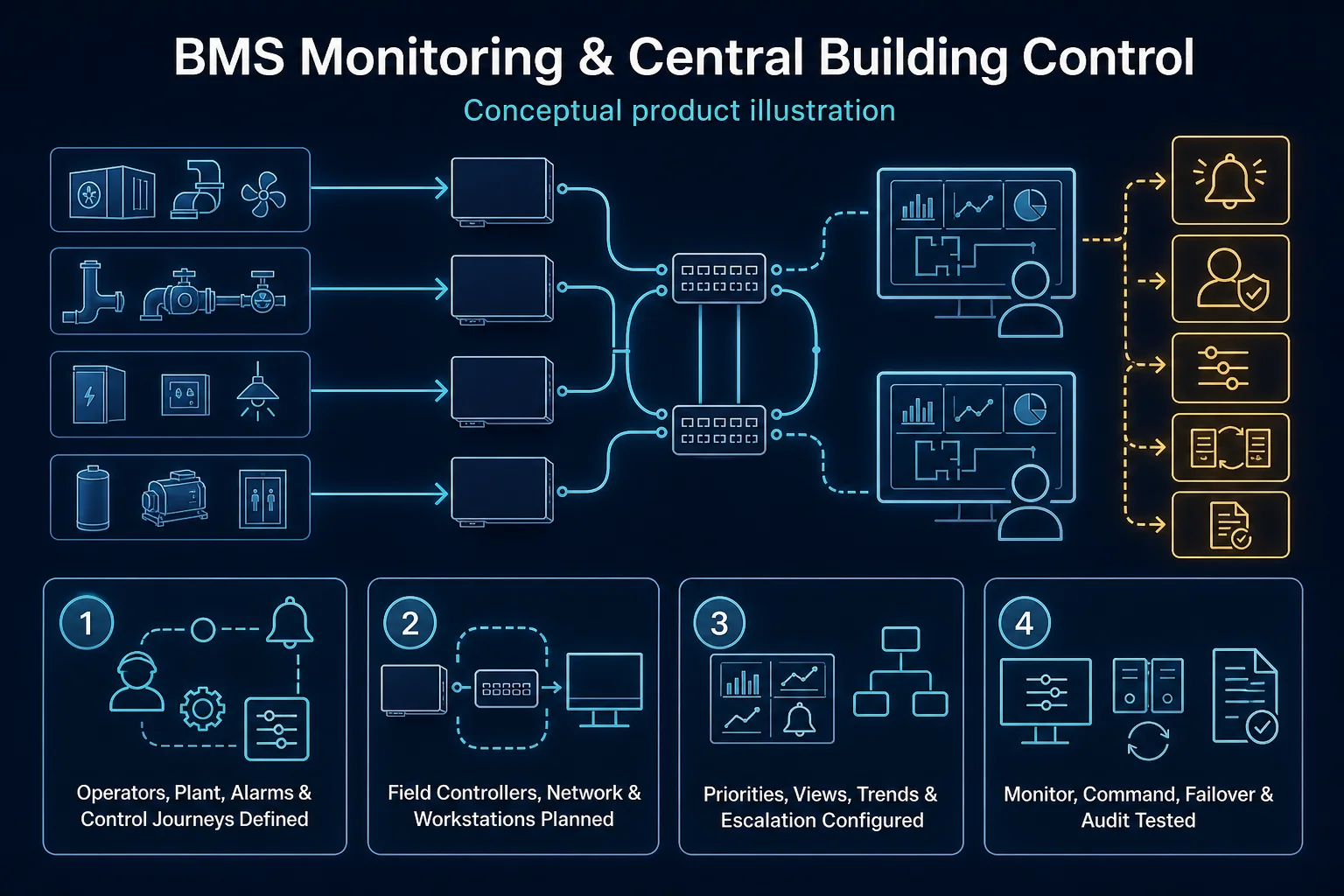
Conceptual BMS Troubleshooting in Kuching system context. BMS Troubleshooting in Kuching combines the installed-system path with the stated service mode; diagnosis and corrective scope remain subject to inspection and approval.
  1. 01BMS Troubleshooting in Kuching
  2. 02Troubleshooting
  3. 03Points, protocols and control responsibility
  4. 04point value, scaling and command
Conceptual BMS Troubleshooting in Kuching title illustration. BMS Troubleshooting in Kuching combines the installed-system path with the stated service mode; diagnosis and corrective scope remain subject to inspection and approval. Conceptual sense, decide and control loop for BMS Troubleshooting in Kuching, derived from this page's scope, interfaces and acceptance record.

Conceptual planning path — not an as-built drawing or project photograph.

What BMS Troubleshooting in Kuching covers

Controller, sensor, dashboard, protocol, integration and upgrade support.

It sits in BMS Service under Building Automation. The final deliverable is shaped by the intended outcome, the installed or proposed environment and the interfaces that must be owned, supplied, integrated and tested.

When to use this page

Use BMS Troubleshooting in Kuching when the installed system needs a troubleshooting workflow focused on BMS layer-by-layer fault isolation, rather than a generic call-out. The work record checks point list, control narrative and source files, failed point, sequence and alarm examples, controller, protocol, plant specialist and backup authority, field point, controller, protocol, graphics and plant states, applies reported symptom and occurrence pattern → power, cabling, network, field-device and configuration isolation → root-cause evidence → corrective action and re-test, and closes with point value, scaling and command, sequence, interlock and alarm, trend, backup, graphics and outstanding-plant record, root-cause layer, restored function and plant dependency. This separates BMS Troubleshooting in Kuching from other BMS Service tasks that may touch the same equipment but require a different method and close-out record.
Typical environments to assess

  • Commercial premises
  • Industrial or institutional sites
  • Residential or mixed-use sites
  • New build and retrofit projects
smart automation

Field decision dossier

Use these four records to keep BMS Troubleshooting in Kuching distinct from adjacent systems or service tasks.

01

Operational purpose

BMS Troubleshooting in Kuching uses the troubleshooting workflow for BMS layer-by-layer fault isolation. Restores supervisory visibility or control by tracing field point, controller logic, protocol, network, graphics, alarm and trend layers.

02

Site evidence to collect

For BMS Troubleshooting in Kuching, record point list, control narrative and source files, failed point, sequence and alarm examples, controller, protocol, plant specialist and backup authority, field point, controller, protocol, graphics and plant states; add point lists, controlled loads or plant, protocols, scenes or sequences, accounts, source files, manual fallback and operator roles.

03

Primary failure boundary

A dashboard symptom may originate in field plant or communications; BMS repair does not transfer mechanical or electrical responsibility. Cloud lifecycle, missing source files, incompatible field devices and unowned plant can make dashboard control misleading or unsafe.

04

Acceptance record

Follow reported symptom and occurrence pattern → power, cabling, network, field-device and configuration isolation → root-cause evidence → corrective action and re-test and close with point value, scaling and command, sequence, interlock and alarm, trend, backup, graphics and outstanding-plant record, root-cause layer, restored function and plant dependency; retain point-to-point results, scenes or sequences, alarm and trend behaviour, priority and fallback tests, backups and operator handover.

Engineering and service decisions

These checkpoints make this page specific to BMS Troubleshooting in Kuching rather than a generic keyword page.

01

Troubleshooting workflow

BMS Troubleshooting in Kuching focuses on BMS layer-by-layer fault isolation and follows reported symptom and occurrence pattern → power, cabling, network, field-device and configuration isolation → root-cause evidence → corrective action and re-test. Reproduces, isolates and measures a reported symptom until the most defensible root-cause boundary is established.

02

Before attendance

For BMS Troubleshooting in Kuching, provide the reported symptom or objective, site contact, recent changes and point list, control narrative and source files, failed point, sequence and alarm examples, controller, protocol, plant specialist and backup authority, field point, controller, protocol, graphics and plant states.

03

Diagnostic or work path

Trace Sensor, meter or command → Control & integration logic → Field interface → Dashboard, trend & handover for BMS Troubleshooting in Kuching without assuming the visible symptom identifies the root cause.

04

Change and repair boundary

A dashboard symptom may originate in field plant or communications; BMS repair does not transfer mechanical or electrical responsibility. Repair, replacement, firmware, programming and parts remain subject to authority, compatibility, warranty, access and serviceability.

05

Close-out record

Close BMS Troubleshooting in Kuching with point value, scaling and command, sequence, interlock and alarm, trend, backup, graphics and outstanding-plant record, root-cause layer, restored function and plant dependency; record point-to-point function test, scene, schedule, trend or alarm test, backup, export and operator handover and list every restored, deferred and excluded item.

Responsibility and evidence boundary

HJ coordinates assessment, engineering, installation, integration, testing and lifecycle support only for the scope recorded in the quotation. ISD handles catalogue, model, datasheet, supply and availability enquiries. Customer, consultant, builder and appointed-specialist responsibilities remain explicit.

Final scope, quantities, compatibility, access, programme, availability and responsibility are confirmed during assessment and quotation.

The applicable regulated scope, competent or appointed persons, approvals, exclusions and records are confirmed before work is accepted.

Questions before proceeding

Use the answers as a planning boundary; site conditions and written scope remain decisive.

Which how BMS and plant faults are separated facts help prepare the Building Automation task BMS Troubleshooting in Kuching?

For this Building Automation task, share the symptom or objective, recent changes, authorised access and point list, control narrative and source files, failed point, sequence and alarm examples, controller, protocol, plant specialist and backup authority, field point, controller, protocol, graphics and plant states.

What can limit the outcome of BMS Troubleshooting in Kuching?

A dashboard symptom may originate in field plant or communications; BMS repair does not transfer mechanical or electrical responsibility. HJ confirms the practical corrective route only after inspection or diagnosis.

What is recorded after BMS Troubleshooting in Kuching?

The close-out records point value, scaling and command, sequence, interlock and alarm, trend, backup, graphics and outstanding-plant record, root-cause layer, restored function and plant dependency, plus restored items, outstanding faults, approved changes and exclusions.

Turn this focused topic into an assessed scope

Share the site, intended outcome, existing equipment and timing. HJ will confirm the correct system route, responsibility boundary and next step.