For a quick question, use Quick Enquiry. For a site visit or detailed project, share the details below.
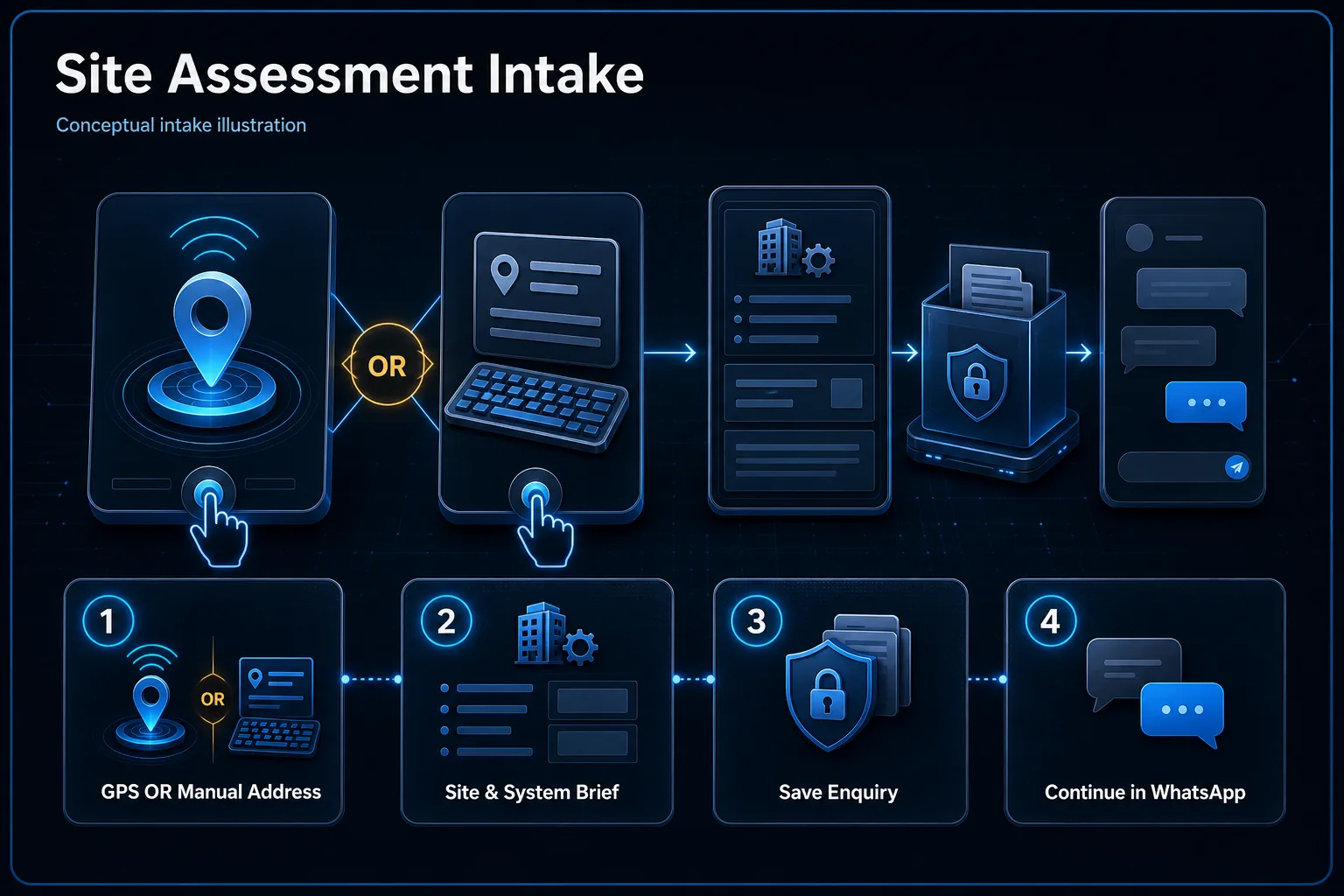
Site assessment intake CanvasChoose GPS or a manual address, then prepare the site brief
01GPS or manual
02Site & system brief
03Save enquiry
04Continue in WhatsApp
Conceptual intake path. GPS is requested only after the customer chooses it, manual address remains available, no real coordinates are shown, and location or enquiry content is not sent to advertising measurement.
Getting a Useful Read
What to Send Us
Entry points
Main door, gate, side entries and any windows or access points you're concerned about.
Perimeter & layout
A wide shot of the compound, driveway or boundary line, plus roughly how large the property is.
Areas of concern
Anywhere you've had an incident before, or a blind spot you already know about.
FAQ
Site Assessment Questions
Are installation surveys and repair visits the same?
Submitting this enquiry costs nothing. A new-installation survey and a repair diagnostic visit are different. HJ confirms free-survey eligibility, any diagnostic or travel charges and the appointment before attendance.
How does the AI-assisted assessment work?
You send us your property details and, ideally, a few photos over WhatsApp. Our team uses AI-assisted analysis alongside our own installation experience to give you a fast preliminary read — likely camera count, coverage gaps, suitable system types — well before we ever step on site. It's a starting point, not a substitute for the in-person survey that finalises your actual system design and quote.
What should I send for a useful preliminary assessment?
Photos of your property's entry points, perimeter, and any areas you're specifically concerned about, plus a rough idea of the property size and which systems you're interested in. A simple floor plan or sketch helps too, but isn't required.
Does a preliminary assessment replace the site survey?
No — it's a fast, useful starting point so you know roughly what to expect before we visit. The in-person site survey is what finalises your exact system design, camera placement and quote, since photos can't fully capture things like cable routes, lighting conditions or building materials.
Complete Solution Context
Choose the complete HJ solution before the next step
This page supports several HJ system packages. Open the master diagram to see how products, infrastructure, software, installation, commissioning and support fit together before choosing a detailed solution.
Site surveys for new installations are free. Send your requirements and HJ will arrange a convenient visit time.
Existing-system diagnosis & repair
A repair visit is different from a new-installation survey. Diagnostic attendance, labour and replacement parts are confirmed with you before work is authorised.
Outstation & travel
Share the exact site location. Travel charges, technician availability and the visit schedule are confirmed before attendance; listing a service area does not mean every visit is free.
Start with the place and the help you need. The existing enquiry form lets you provide a location and selected interests so HJ can review the scope with you.